
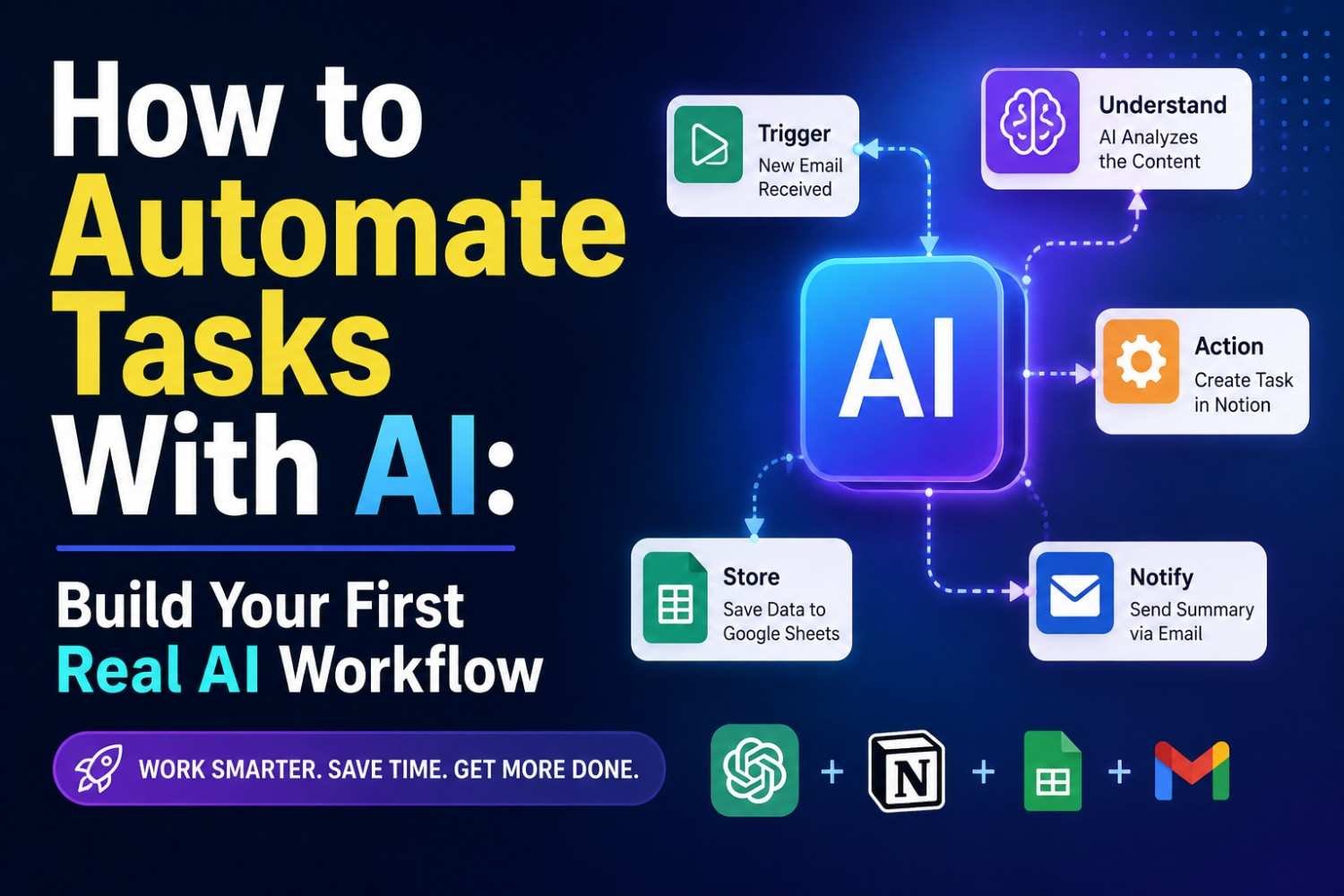
Email was eating small pieces of my day. One reply looks easy. Then another comes. Then five more. You read, think what they want, write answer, check it again, and send. Nothing looks big alone, but together it becomes real work.
So I did not try to automate my whole day. I picked this one boring job first: email handling.
The flow I wanted was simple:
New email → AI understands intent → makes short summary → drafts reply → checks risk and confidence → I approve → send → log
That is basically AI task automation. A task comes in, software catches it, AI handles the part needing language understanding, and normal workflow rules move the work to next step.
I also did not let it send everything alone. That felt risky. Email can contain money question, angry customer, private detail, or something AI misunderstood. Current Gmail systems can create a draft first and send it only later, which makes this safer setup practical.
If you are new, start like this. One repeated task. One clear result. You learn faster, and when it breaks, you know where to look.
The Exact Task I Chose to Automate
I did not start with some big business system. That was mistake I almost make.
I looked at my normal day first. One thing keep coming again and again: emails.
Every mail looked small. Read it. Understand what person asking. Check if urgent. Think reply. Type reply. Read again because one wrong line can create another problem. Then send. Sometimes I also write reminder like, “call this person tomorrow” or “check payment later.”
One email maybe take only few minutes. But many emails together, brain become tired.
So I asked myself, what tasks can AI automate without making my work risky?
Email handling looked good because much of the work was repeated that need AI automation, but still some part needed my judgment.
My old flow was simple:
Email comes → I read → find intent → check urgency → write reply → review → send → make follow-up if needed.
This became my first task to automate.
Why this one?
Because I already knew the process very well. That matters more than choosing some fancy task.
If you are asking what should I automate first, watch your own day. Find work you repeat many times, has clear steps, and makes you say, “Again this?”
Start there.
Not biggest task.
The boring repeated one is often better.
How I Decided Which Steps Needed AI
At first, I made one mistake. I was trying to put AI in every step.
That looked smart on screen. In real work, it made the workflow harder.
Then I looked at my email task again. A new email coming in does not need any thinking. A rule can simply say, “When new email arrives, start.” Sending an approved draft also does not need AI. Same for saving the result in a log.
So I split the work.
I used AI where the email was messy: understanding what the person wants, pulling useful details, making a short summary, and writing a reply.
I used normal automation where the answer was already clear: trigger the workflow, check conditions, wait for my approval, send the email, and save the result.
This small change made the whole thing easier to control.
Zapier describes AI workflows in a similar way: AI is useful when inputs are not clean yes-or-no data and need context understanding, while normal workflow automation is still good for repeatable steps.
I also did not need an AI agent here. Agents can plan and use tools across multi-step work, but my email flow already had a clear path.
My simple rule became this:
If the step needs understanding, use AI. If the step already has a fixed answer, use a rule.
That saved me from building something clever but difficult to trust.
What You Need Before You Build
Before you automate anything, keep tools simple. I learned this after making one small email workflow too big. Too many AI tools, then one connection broke, and I did not even know where problem started.
You need an email account, one AI model, and a workflow tool. That is enough for first try. A spreadsheet or small database is useful later, mainly to save message ID, result, error, or status.
You also need permission to connect your email. This part looks boring, but check it. Giving full access when only reading email is needed is not good idea.
And no, you do not need Python first. You can automate tasks with AI using no-code tools. Low-code gives little more control. Python or custom code helps when workflow becomes special or messy.
An API is like a door one software use to talk with another software. A webhook is more like a knock on that door: “Hey, new email came, start now.”
Start small. Make one connection work first.
Step 1 — Trigger the Workflow When an Email Arrives
The first part look very simple. New email comes, workflow starts. But this small point gave me trouble more than I expected.
A trigger is just the event telling your automation, “something happened, start now.” In our case, that event is a new incoming email. Gmail itself supports push notifications for mailbox changes, so an app can react when something changes instead of checking the inbox again and again.
When email enters, I collect only few things:
- sender
- subject
- message body
- received time
- message or conversation ID
That last ID is very important. I learned this after seeing same mail move through workflow twice. It feels harmless during testing. In real use, two runs may create two drafts, two tasks, even two replies.
So before next action, I check: Did I already process this message ID?
If yes, stop there. If no, save ID and continue.
This simple idea is called idempotency. Big word, simple job: running same event again should not create same result twice.
Duplicate trigger problems do happen in real workflow tools, especially around polling and longer-running executions.
So our beginning becomes:
New email → capture details → check ID → continue only once.
Small guard, but it saved me from a very ugly automation later.
Step 2 — Use AI to Understand the Email
Now email reached our workflow. But still it is only text. System does not know what this person really wants.
This part troubled me first.
A mail may say, “My payment went through but order still showing pending.” Another person writes three long paragraphs for same problem. Normal rules struggle here. So I let AI read the subject and email body, then return few fixed details. Email classification like this is already used in real automation workflows for sorting messages and creating draft replies.
I ask for these fields:
| Field | What I need |
|---|---|
| Intent | What user wants |
| Summary | Short meaning |
| Urgency | Low, medium, high |
| Reply required | Yes or no |
| Risk level | Low, medium, high |
| Confidence | How sure it is |
My prompt follows one simple order:
Role → Task → Context → Allowed categories → Rules → Required output
For example, I tell it: You handle incoming customer emails. Read this message. Choose intent only from support, sales, complaint, scheduling, billing, or other. Never guess missing facts. Return the required fields.
Here one small change made my workflow much better: I stopped asking for normal paragraph replies.
I asked for structured output.
Why? Because next workflow step need values, not beautiful writing. Current AI platforms support schema-based structured responses specifically to make outputs more predictable for software workflows.
Still, don’t trust confidence blindly. Test weird emails too. Short ones. Angry ones. Half written ones. That is where your real automation starts showing its weakness.
Step 3 — Add Rules Before AI Can Take Action
This part saved me from many bad replies.
At first, I thought, if the system understand email, then just let it do next work. Bad idea. Some emails look simple, but inside they carry money issue, angry customer, private detail, or something we should not answer fast.
So I made routing rules before any reply can move forward.
For example:
- Confidence below 80% → send for review.
- Complaint → human should check.
- Payment or refund email → never auto-send.
- Normal common question → create draft.
- Spam or useless message → stop there.
This is called human-in-the-loop, but idea is very simple. Machine can do the boring part. You keep the final control where mistake can hurt.
I also learned one thing. Do not give more freedom just because automation working fine for few days. One strange email is enough to create problem.
Think of guardrails like road sides. Your workflow can move fast, but it should not leave the road.
Before allowing any action, ask yourself: If this decision is wrong, what happens next?
If answer is “nothing serious,” automation can move ahead.
If answer involves money, legal issue, customer anger, account access, private data, or big business change, stop it. Let a person see.
Good AI automation is not about giving full freedom. It is about giving only the freedom that task really needs.
Step 4 — Make AI Draft the Response
Now the useful part starts. We have understood the email. But I would not tell AI, “Reply this customer.” Too open. I tried such prompts before, and sometimes the answer looked good but carried a fact nobody gave.
Give it the original email first. Then give only approved facts it can use. Maybe your return policy, service details, price, delivery rule, or FAQ. Also tell the tone: friendly, short, calm, professional, whatever fits your business.
I use a rule something like this:
- Answer only from provided information.
- Do not guess names, price, dates, refund rules, or promises.
- If needed information is missing, ask for it.
- If unsure, mark the reply for human review.
This small rule matters. Language models can produce believable but false statements, commonly called hallucinations. OpenAI describes hallucinations as plausible statements that are still false.
So, don’t make the model remember your business from nowhere.
Give it the source.
This is called grounding. Google also describes grounding as using retrieved information to improve accuracy and freshness of generated answers.
Your flow now becomes:
Customer email → approved knowledge → draft reply → review
Yes, AI can automate email responses. But good automation is not about writing fastest. It is about giving the model less room to make things up.
Step 5 — Add Human Approval Before Sending
I would not let the workflow send every reply by itself. I tried that idea first, but one strange email changed my mind. The draft looked good, very confident also, but the customer was asking something different. Small mistake in reading. Big problem if it gets sent.
So I keep one simple flow:
AI draft → you review → approve, edit, or reject → send
For normal questions, review may take only few seconds. But some emails need your eyes more. A complaint. A payment issue. Legal words. Security problem. Or a request that looks unusual.
I also send the message to review when confidence is low. This matters because a well-written answer is not always a correct answer.
NIST says different AI risks may need different levels of human oversight, and OWASP also warns that giving language models too much autonomy or permission can lead to damaging actions. OpenAI’s current agent safety guidance also recommends human approval for sensitive tool actions.
You don’t need stop automation. Just stop the dangerous last step.
My rule is simple: let machine prepare, let human decide when mistake can hurt.
Step 6 — Log Every Workflow Run
I used to ignore logs. Big mistake. When one AI automation failed, I only saw “something went wrong.” But what? Email issue, bad reply, low confidence, API error? I had no clue.
So now I store every workflow run.
Keep simple details:
- message ID
- email classification
- confidence score
- generated draft
- approval result
- execution time
- error message
- human edits
You may feel this is extra work. It is not. This data become your eyes.
Example, if 12 emails marked as “sales” but humans changed 5 of them into “support,” then your classification step need fixing. If one workflow takes 3 seconds today and 25 seconds tomorrow, something changed.
For debugging AI workflows, first I check the failed run. Then input. Then output. Then action.
Do not only ask, “Did automation run?”
Ask, “What happened inside it?”
That is observability. Without logs, you are guessing. With logs, you can actually repair your automation.
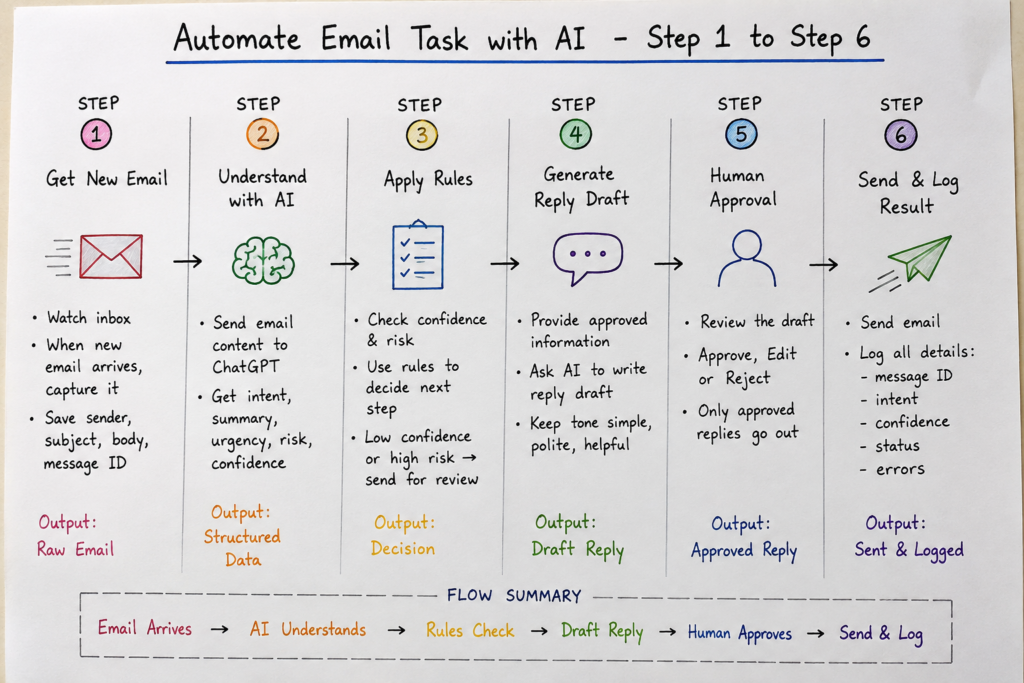
Example Scenario: Automate One Email Task With ChatGPT
Let us take one real task. A new email comes. You read it, understand what person wants, then write reply. Same work again tomorrow. And next day too.
I wanted to remove this small boring work first. Not whole inbox. That was my mistake before. I tried too much in one flow and then everything became messy.
So this time I kept only this:
New email → understand message → make summary → draft reply → check risk → human approve → save result
ChatGPT can work with connected apps in ChatGPT, and OpenAI says apps can search connected data and, where action support is available, perform actions too. Gmail is also available as a connected Google app in ChatGPT for supported users.
Step 1: Get the New Email
Your automation tool can watch Gmail.
Very basic logic can look like this:
email = get_new_email()

sender = email["from"]
subject = email["subject"]
body = email["body"]
message_id = email["id"]
Do not send whole mailbox to ChatGPT. No need.
I normally take only sender, subject, body, and message ID.
Before doing anything, check if this email already processed.
if message_id in processed_messages:
    stop_workflow()
This small check saved me one ugly problem. During testing, workflow retried after error and almost created two replies.
Step 2: Ask ChatGPT What the Email Means
Now we give the email text.
Do not simply say, “Understand this email.”
That prompt is too loose.
Use something like:
You are helping me sort incoming emails.

Read the email below.

Return:
- intent
- short_summary
- urgency
- reply_needed
- risk_level
- confidence

Allowed intent:
question, support, sales, complaint, meeting, other.

If information is not clear, do not guess.
Set confidence low.

Email:
{{email_body}}
You want output like:
{
  "intent": "support",
  "short_summary": "Customer cannot login to account.",
  "urgency": "medium",
  "reply_needed": true,
  "risk_level": "low",
  "confidence": 92
}
This part is important. We need data our next step can read, not nice long paragraph.
Step 3: Put Simple Rules Around ChatGPT
Now we don’t let model decide everything.
This is where real automation become safer.
My logic looks roughly like this:
if result["confidence"] < 80:
    send_for_review()

elif result["risk_level"] == "high":
    send_for_review()

elif result["intent"] in ["complaint", "payment", "legal"]:
    send_for_review()

elif result["reply_needed"] is True:
    create_ai_draft()

else:
    log_and_stop()
Why I use 80 here?
Not because 80 is magic number. It is only my starting rule. Your email type may need 90, or maybe confidence field itself may not be reliable enough. Test it.
I learned this one little hard way. A vague email said something like, “Can you fix what we talked yesterday?”
Model tried to understand it. But there was no yesterday context.
That reply should never go automatic.
Step 4: Create the Reply Draft
Now ChatGPT has to write reply, but give boundaries.
My prompt:
Write a short email reply.

Use only facts found in the email and approved information below.

Do not invent price, date, policy, promise, refund, or technical fact.

If important information is missing, ask the sender for that information.

Tone:
simple, polite, helpful.

Customer email:
{{email_body}}

Approved information:
{{approved_context}}
Then save result:
draft_reply = generate_reply(prompt)If you run business email automation, this approved information part matter a lot.
Otherwise model may produce something which sounds very sure but is not your company rule.
That happened in one of my tests. Reply looked beautiful. Problem was, one sentence was not supported anywhere.
Nice writing can still be wrong writing.
Step 5: Human Checks Before Sending
I would not start first version with auto-send.
Make draft first.
approval = request_human_review(
    sender=sender,
    subject=subject,
    summary=result["short_summary"],
    confidence=result["confidence"],
    draft=draft_reply
)

if approval == "approved":
    send_email(draft_reply)

elif approval == "edited":
    send_email(edited_reply)

else:
    stop_workflow()
This is simple human-in-the-loop automation.
You still save time because you do not start from empty page. You only check.
And for complaint, payment, legal, security, or strange customer message, this human gate is very useful.
Step 6: Log What Happened
Please do not skip this part.
At beginning I thought logging was extra work. Later, when one flow stopped, logs were the only thing telling me where it died.
Save few fields:
save_log({
    "message_id": message_id,
    "intent": result["intent"],
    "confidence": result["confidence"],
    "risk": result["risk_level"],
    "approved": approval,
    "sent": email_sent,
    "error": error_message
})
A simple Google Sheet is enough when you are learning.
Your full logic is now:
New email
   ↓
Check duplicate
   ↓
Send text to ChatGPT
   ↓
Get intent + summary + risk + confidence
   ↓
Apply rules
   ↓
Generate reply draft
   ↓
Human approves
   ↓
Send email
   ↓
Save log
That is already a real AI task automation.
Not giant agent. Not twenty tools.
One useful thing working properly.
ChatGPT apps can connect with outside services and can support actions depending on the app and permissions available, so the exact “send” part may differ by account, workspace, or connected tool.
My suggestion for your first test is even smaller.
Take 10 old emails. Do not send anything.
Run only:
Email → classify → summary → draft
Read every result yourself.
Then put three bad emails. One vague. One angry. One with missing details.
See what happens.
If it survives those tests, then add approval. After that only think about sending.
This slower way felt boring to me first. But boring testing is much better than waking up and finding your automation sent a confident wrong mail to real person.
What Failed During Testing—and How I Fixed It
My first test looked good. Few normal emails came in, system read them, made reply drafts, and everything felt easy.
Then I tried bad emails.
That is where real problems started.
Failure 1: AI misunderstood a vague message
One email only said, “Can you help with yesterday problem?”
There was no real context. Still, the system tried to guess what the sender wanted. This is dangerous.
I changed the flow. When confidence is low, no automatic reply. It goes to human review.
You should test unclear messages on purpose. Real users rarely write perfect emails.
Failure 2: It added details that were never given
This one worried me more. A reply sounded very sure, but part of the answer was not in my approved data.
My fix was simple: I gave the workflow only trusted information and told it not to guess. If answer is missing, it must ask for review.
Structured, controlled output also makes automation easier to check. OpenAI recommends structured outputs when applications need responses matching a defined schema.
Failure 3: One email got processed twice
During retry testing, same message entered the flow again.
So I started storing the unique message ID before processing. If that ID already exists, workflow stops.
Small check. Big protection.
Failure 4: Gmail API stopped for a short time
At first, my reaction was “retry it.”
But blind retry is risky. What if email already sent?
Now I check previous action status first, then retry only failed safe steps. Google itself recommends exponential backoff for temporary Gmail API errors and rate-limit problems.
This testing changed my view. AI automation usually fails at the edges, not the happy path. Your recovery plan is part of the automation, not extra work.
Test These Cases Before You Turn It On
Before I let any AI automation touch real email, I keep it in draft-only mode. This saved me more than one bad moment. You think workflow is ready because five test emails worked. Then one strange mail comes, and whole thing act different.
I test these eight cases every time:
- Normal email — clear question, clear reply. This should be easy.
- Vague email — “Can you check this?” Now system must not guess.
- Missing information — sender forgot order number, date, or other detail. It should ask, not invent.
- Complaint — angry words can confuse intent. I send these for human review.
- Unrelated email — newsletter, spam, random message. Workflow should stop.
- Duplicate execution — same email processed twice. This one can create embarrassing double replies.
- AI failure — model gives empty, broken, or strange output.
- Email service failure — sending API goes down halfway.
I learned one thing slowly: testing AI automation is not about proving it works. It is more about finding where it breaks.
So I run ugly cases first. Bad inputs. Half sentences. Wrong formats.
If your workflow fails safely, keeps logs, avoids duplicate actions, and sends doubtful cases to you, then it becoming reliable. Not perfect. But usable in real work.
How I Measure Whether the Automation Is Actually Worth It
I never trust automation just because it runs without error. That is not enough. I want know one thing first: is this thing really saving my time, or only looking smart?
Before I automate, I check manual time. Maybe one email takes me 5 minutes. Twenty emails means around 100 minutes. After automation, system may finish processing fast, but I still spend time checking replies. This human review time matters.
I track few simple numbers:
| Metric | What I watch |
|---|---|
| Manual time | Time before automation |
| Processing time | How long workflow takes |
| Review time | Minutes I spend checking |
| Success rate | Runs finished correctly |
| Edit rate | Replies I must change |
| Failure rate | Runs stopped or went wrong |
| Cost per run | Tool and model cost |
| Monthly time saved | Real hours saved |
My simple formula is:
Net time saved = previous manual effort − review time − maintenance time
This changed how I see AI automation ROI.
Sometimes workflow saves 80 minutes, but I spend 40 minutes fixing bad replies. Then saving is not 80. It is closer to 40.
So, does AI automation really save time? Yes, sometimes very much. But measure your real work. Your dashboard should not impress you. Your free time should.
How I Reduced Cost and Improved Reliability
At first, my AI automation was working, but bill slowly going up. I found one silly reason. I was sending almost same long instructions again and again.
So I changed the flow.
For simple email classification, I use smaller and cheaper model. For difficult message, unclear complaint, or strange request, then stronger model gets the job. This idea also matches OpenAI’s model-selection advice: after accuracy is good, use the cheapest and fastest model that still gives required quality.
I also stopped asking AI for things normal rules can do. Checking email type, duplicate ID, empty field? Simple logic does it. No model call needed.
Then I cut old conversation text and useless context. Repeated context can also cost money; Google says context caching can reduce cost and latency when the same content is reused.
One more lesson came after failures. I split one big workflow into small parts—classify, draft, approve, send, log.
Now when something breaks, I know where.
And I watch failed runs. Because cheap automation which silently fails is not cheap at all.
How This Same Framework Works for Other Tasks
Once I made one email workflow, I understood something simple. The tool was not the main thing. The pattern was.
You can use same AI automation framework for many business tasks, only input and action will change.
Invoices: invoice comes → AI reads amount, date, vendor → rules check missing or wrong data → human approves → record goes into accounting.
Leads: form comes → AI checks need, company, interest → rules score lead → good lead moves to CRM → follow-up starts.
Meetings: transcript comes → AI makes summary → finds action items → we check important points → tasks created.
Support: ticket arrives → AI finds issue type → prepares answer → risky or angry customer case goes to human.
Content: brief comes → research → draft → editor review → publish.
I tried thinking “Can AI automate business processes fully?” Sometimes yes, but not every step should go free. That caused trouble for me in early tests. One wrong field, whole next flow became wrong.
So I keep this small chain in mind:
Trigger → AI → Rules → Approval → Action → Log
If you can map your task into these boxes, you already have base of automation. Start small. Watch where it breaks. Fix that point. Then scale.
When You Should Not Automate a Task
Not every work need automation. I learned this after trying to automate one small job that was changing almost every week. More fixing happened than saving time.
If your task carry high risk, stop and think first. Money approval, legal reply, hiring choice, health decision, customer conflict—one wrong action can become big trouble. Here, AI assistance is better. Let it prepare, sort, or suggest. You make final call.
Also, when data is messy, missing, or coming different way every time, full automation can fail quietly. That is dangerous.
Low-volume task also may not worth building a system for it.
And sometimes normal automation is better than AI. If rule is simple like “if payment received, send receipt,” use fixed rule.
My small rule is this: automate repeated safe steps. Keep human judgment where trust, emotion, money, or serious result is involved.
My AI Automation Checklist Before Going Live
Before I turn any AI automation on, I stop and check boring things first. This saved me more than once.
Can I explain the manual work clearly? If I cannot explain it on paper, automation also become messy. Is this task really repeating, or I am trying to automate something just because AI looks exciting?
I check few things:
- Is the input already digital?
- Which step really need AI thinking?
- Which step can use simple fixed rule?
- What happen when confidence is low?
- Does sending, deleting, payment, or customer reply need my approval?
- How I stop same job running two times?
- If API fails, will data stay safe?
- Where can I see logs later?
- Is this saving time or only moving work somewhere else?
- Can I take control manually when things go wrong?
One mistake I made earlier was checking only the happy path. Real users don’t give clean input. APIs fail. Messages come half-written.
So before going live, I try to break the workflow myself.
If it survives that, then I trust it little more.
Conclusion — Start With One Workflow, Then Expand
When I first tried to automate tasks with AI, I made one mistake. I tried too much.
Better way is small.
First understand the task. Write every step. See what part is simple rule, what part needs language understanding, then connect them slowly. Test bad cases too, not only happy cases.
In our email example, flow was simple:
Email → classification → summary → draft → guardrail → approval → send → log
Looks easy on paper. But real emails come messy. People write half sentences, wrong details, strange requests. This is where testing matters.
Do not give full control on day one. Let it draft. You check. Then slowly trust more when results become stable.
Now look at your own work.
Choose one task you did at least five times recently. Write every manual step first. Do this before opening any AI automation tool.
That small paper note can become your first real workflow.
