
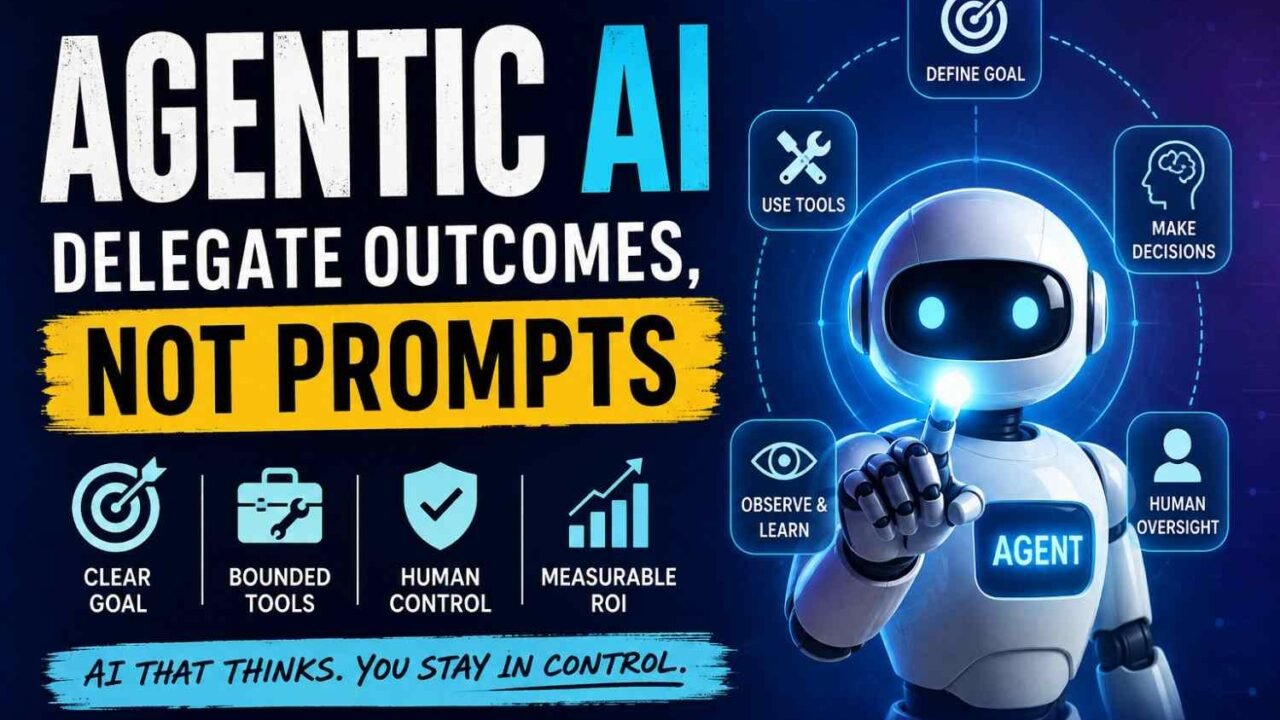
Agentic AI means AI that does more than give one answer. You give it a goal. Then it may decide next step, use tools, check what happened, and change its action until work gets done.
Simple way I see it:
A chatbot tells you what to do.
An agentic system may actually do those steps for you.
This is where agentic AI meaning becomes easy.
Say you ask, “Why my refund not coming?” Normal chatbot may explain refund rules. An AI agent with proper access may check your order, read refund policy, start return process, update system, then send next message.
But this does not mean fully free robot mind. Some workflows need human approval.
So, what is agentic AI? It is goal-driven AI with agency, tools, actions, and a working loop.
What Is Agentic AI?
Agentic AI means a system that does more than answer you. It can take a goal, decide what should happen next, use tools, check the result, then continue.
The word agentic comes from agency. Simple meaning, ability to act toward a goal. IBM explains agentic AI as systems that can complete specific goals with limited human supervision.
But don’t think every agent is fully free.
Some systems ask you before every important action. Others can finish many steps alone. So agenticness is more like a scale, not just “agentic” or “not agentic.” Agentic.ai also describes it as a spectrum of autonomy.
One thing confused me first. The language model itself is not always the full agent. In real use, the system may have:
- a model
- instructions and context
- memory
- tools or APIs
- permissions
- workflow state
- feedback
- evaluation rules
- human approval points
That full setup makes the action possible.
Is it really agentic?
Ask these simple questions.
- Does it receive a goal, not only one prompt?
- Can it choose the next step?
- Can it use outside tools?
- Can it see what happened?
- Can it change the plan?
- Can it continue without asking you every time?
More yes answers usually means more autonomy. A chatbot may talk well. An agentic system can decide, act, observe, and adjust until the work is done.
How Does Agentic AI Work?
Agentic AI works less like a normal chatbot and more like a worker who keeps checking what happened after every step.
You give it a goal. It looks at the situation. Thinks what should happen next. Uses a tool. Checks the result. Then maybe changes the plan.
AWS explains this basic agent cycle as perceive → reason → act, and its broader agentic AI model also includes learning from what happened.
That loop is the important part.
The Agent Loop
A simple agentic AI workflow can look like this:
Goal → Observe → Reason → Plan → Act → Check → Adapt → Finish or Escalate
Goal: First, the system needs to know what success means. “Help the customer” is weak. “Resolve the delayed order or send it to a human” is much clearer.
Observe: It collects useful information. Maybe an order number, courier status, customer message, database record, or API response.
Reason: Now the model tries to understand what is happening. Is the parcel lost? Just late? Already returned?
Plan: It breaks the job into smaller steps. This is where agentic AI planning becomes useful.
Act: The agent may search, call an API, query a database, open an application, run code, or update another system.
Check: This part matters a lot. It checks whether the action actually worked.
Adapt: If something failed, it can try another route instead of blindly continuing.
Finish or escalate: It stops when the goal is reached, or sends the problem to a person when confidence is low or permission is missing.
AWS describes this feedback pattern clearly: actions change the environment, the agent sees the new result, and that new information affects the next decision.
The Seven Building Blocks Behind Agentic AI
Under that simple loop, several parts are working together:
- Model or LLM – understands language, reasons, and helps choose the next step.
- Instructions and goals – tell the system what it should achieve and what it should never do.
- Context and data – customer records, documents, live system data, previous messages.
- Planning – breaks one big problem into smaller jobs.
- Tools – search, APIs, databases, browsers, code, business apps.
- Memory and state – remembers what already happened in the current task, and sometimes past useful information.
- Evaluation and guardrails – checks results, blocks unsafe actions, retries, stops, or asks for human approval.
MCP can also sit around this tool layer. Its purpose is to make access to tools and outside context more standardized, so every connection does not need to be invented differently.
Here is a small real-world example.
Goal:
“Resolve this delayed customer order.”
The agent may do this:
Find order → check courier → read company policy → decide allowed options → offer replacement → update CRM → trigger fulfillment → send confirmation
Looks smooth on paper.
Real systems are messier.
Maybe the courier API is down. Maybe the address changed. Maybe company policy says replacement is allowed only after seven days. Good agentic AI architecture does not simply keep guessing. It checks state, follows rules, and knows when to stop.
That is also why not every step should use an LLM. AWS recommends keeping deterministic logic as normal coded logic where possible, and using AI only where judgment actually adds value.
This one idea saves many bad agent projects.
Use normal code for things that should always happen the same way.
Use agent reasoning where the next step depends on changing information.
That is really how AI agents make decisions. Not magic. Mostly a repeated cycle of look, think, act, check, and adjust.
Agentic AI vs Generative AI vs AI Agents vs Automation
These words look same sometimes. They are not.
I also got confused first time. Chatbot writing an email looked smart, so I thought this is agent. But no. Creating an answer and actually doing a job are different things.
Think about one office bill.
Normal automation can take invoice, check fixed rules, then send it to finance. Good work. Fast also. But if something strange happens, mostly it stops.
Generative AI works different. You ask, “Write reply to this vendor.” It creates the text. Useful, but usually you still decide what happen next.
An AI agent goes further. You may give one goal like, “Find why this invoice failed.” It can check data, use tools, choose another step, and keep working.
An agentic AI system can connect bigger work. Maybe one agent checks invoice, another verifies supplier details, another updates software, while rules and human approval sit around them.
| Technology | Main job | Chooses next step? | Uses tools? | Adapts? | Simple example |
|---|---|---|---|---|---|
| Traditional automation | Follow fixed rules | No | Yes | Very little | Invoice workflow |
| Generative AI | Create content | Usually no | Sometimes | Limited | Draft email |
| Copilot | Help a person | Limited | Often | Limited | Suggest code |
| AI agent | Finish a goal | Yes | Yes | Yes | Research agent |
| Agentic system | Run bigger goal-based work | Yes | Yes | Yes | End-to-end workflow |
One warning here.
There is no perfect wall between AI agents and agentic AI. Companies use these names little differently. Google Cloud describes AI agents as building blocks inside broader agentic AI systems, where several agents may work together on larger goals.
Google’s current agent platform also separates predictable workflow agents from more adaptive agent-led routing. That is important. Not every task need “full agent.” Sometimes normal automation is cheaper, safer, and easier to fix.
So when comparing agentic AI vs generative AI, don’t ask only, “Can it talk?”
Ask this:
Can it decide, act, check result, and change the next move without you controlling every step?
That is where the real difference starts.
Agentic AI Examples: What It Can Actually Do Today
Agentic AI examples make more sense when we stop looking at fancy demos. Look at work which already hurts people. Too many steps. Too many tabs. Same checking again and again. This is where these systems becoming useful.
1. Software engineering
A developer may get one bug, but fixing it is not one small action.
The system can read the issue, inspect code files, find related parts, change code, run tests, see failure, fix again, then prepare the final change for review.
This is already moving beyond simple code suggestion. OpenAI reported in June 2026 that 70.2% of sampled individual Codex users had made at least one request estimated to represent more than one hour of human work. Coding was also one of the first areas where this longer task style became common.
Still, human review matters before important production code goes live.
2. Customer service
Think one angry customer saying, “My order never came.”
Instead of only drafting a reply, an agent may check the order, courier status, refund rules and customer history. Then it can prepare a refund or replacement, update CRM records and send follow-up.
The human boundary should stay around unusual refunds, fraud signs and high-value cases.
3. Research
You give one question.
The agent searches sources, opens useful pages, compares claims, removes weak evidence and builds a report.
This can save research time. But source checking still need human eyes, especially for medical, legal, financial or business decisions.
4. Sales operations
One new lead can create many tiny jobs.
Find company data → check fit → add information into CRM → draft personal message → place lead into follow-up queue.
Salesperson then spends more time talking with serious buyers, not copying fields.
5. Cybersecurity
A strange login appears.
An agent may gather logs, connect related alerts, check devices and suggest containment. Some low-risk actions can be automatic.
But deleting accounts, blocking major systems or changing critical access? I would keep human approval there.
6. Physical and scientific work
This area now getting more serious.
On August 27, 2026, Anthropic introduced a research preview called the Model Hardware Standard, designed to let agents communicate with programmable lab and industrial equipment, including microscopes and robotic arms. Early work includes areas such as drug research and equipment calibration.
That changes the picture.
Agentic AI is not only answering questions now.
It can increasingly observe → decide → use tools → check result → continue, while humans decide how much control it should really have.
Agentic AI Examples: What It Can Actually Do Today
Agentic AI examples make more sense when we stop looking at fancy demos. Look at work which already hurts people. Too many steps. Too many tabs. Same checking again and again. This is where these systems becoming useful.
1. Software engineering
A developer may get one bug, but fixing it is not one small action.
The system can read the issue, inspect code files, find related parts, change code, run tests, see failure, fix again, then prepare the final change for review.
This is already moving beyond simple code suggestion. OpenAI reported in June 2026 that 70.2% of sampled individual Codex users had made at least one request estimated to represent more than one hour of human work. Coding was also one of the first areas where this longer task style became common.
Still, human review matters before important production code goes live.
2. Customer service
Think one angry customer saying, “My order never came.”
Instead of only drafting a reply, an agent may check the order, courier status, refund rules and customer history. Then it can prepare a refund or replacement, update CRM records and send follow-up.
The human boundary should stay around unusual refunds, fraud signs and high-value cases.
3. Research
You give one question.
The agent searches sources, opens useful pages, compares claims, removes weak evidence and builds a report.
This can save research time. But source checking still need human eyes, especially for medical, legal, financial or business decisions.
4. Sales operations
One new lead can create many tiny jobs.
Find company data → check fit → add information into CRM → draft personal message → place lead into follow-up queue.
Salesperson then spends more time talking with serious buyers, not copying fields.
5. Cybersecurity
A strange login appears.
An agent may gather logs, connect related alerts, check devices and suggest containment. Some low-risk actions can be automatic.
But deleting accounts, blocking major systems or changing critical access? I would keep human approval there.
6. Physical and scientific work
This area now getting more serious.
On August 27, 2026, Anthropic introduced a research preview called the Model Hardware Standard, designed to let agents communicate with programmable lab and industrial equipment, including microscopes and robotic arms. Early work includes areas such as drug research and equipment calibration.
That changes the picture.
Agentic AI is not only answering questions now.
It can increasingly observe → decide → use tools → check result → continue, while humans decide how much control it should really have.
The Most Important Question: When Should You Use Agentic AI?
Not every work problem needs an AI agent. This part matters a lot.
If your task is fixed, boring, and same steps happen every time, normal automation may be better. Cheaper too. Easier to test. Less strange surprises.
But if the path can change while the work is happening, agentic AI starts making more sense.
I use this simple Agentic Fit Test.
Use an agent when your task has:
- one clear goal
- many connected steps
- some unknown things
- decisions based on new information
- access to useful tools or company data
- a result you can measure
- mistakes that can be fixed
- enough business value to cover model and tool cost
- clear limits on what the system can and cannot do
Think about customer support.
A strong-fit task is:
“Investigate unresolved support tickets, check account history, find the cause, then suggest or perform an approved solution.”
The path is not always same. One customer has payment issue. Another has delivery problem. Another account may need refund check. The system must look, decide, then choose next action.
Now take this:
“Every evening copy these 10 database fields into another database.”
Why make an agent think about this every night? There is almost nothing to decide. A fixed script can do it.
This is not only theory. In an August 2026 Reddit discussion, people building real workflows kept coming back to one point: when the route is known before work starts, a normal workflow is usually cheaper, faster and easier to debug. Agents become useful when the next step depends on what the system just discovered.
One developer described production setups as mostly structured workflow, with specialist reasoning used only where needed. Another discussion warned about paying for repeated model loops when a fixed pipeline could finish the same job more reliably.
So ask yourself one useful question:
Can I draw the full flow before the job starts?
If yes, build a workflow first.
If no, and the system must keep choosing its route, that may be the right place for agentic AI.
When NOT to Use Agentic AI
Agentic AI looks exciting. But sometimes, using it is just adding a smart machine where simple code already doing job better.
I first ask one boring question: Does this task really need thinking?
If every step is fixed — get file, check value, move data, send email — normal automation may be safer. Faster too. No reason to let an agent “decide” something when there is nothing to decide.
Be more careful when one wrong action can hurt. Money transfer. Delete customer records. Change production server. Approve loan. Medical or legal decision. Here human approval should stay between decision and final action.
Bad data is another red light. An agent working on wrong, old, or missing information can confidently walk in wrong direction.
Deloitte’s August 2026 survey of more than 500 U.S. business and IT leaders found only 5% of organizations said their business processes were highly prepared for AI agents. Just 15% had scaled cross-functional multi-agent adoption.
So don’t put agents over a broken process and expect magic.
Use normal code when rules are clear. Use agentic AI where some judgment is truly needed. And when result can seriously affect people, money, security, or business — keep a human close.
Simple rule: Automate certainty. Use agents for bounded uncertainty. Keep humans over consequential decisions.
Single Agent vs Multi-Agent System
A single agent vs multi agent choice looks simple first. But once you build real workflow, little problems start coming.
A single agent with tools is often enough. It can search, call API, read files, update data, and finish one clear job. Setup also easier. Cost usually lower. When something breaks, you have fewer places to check.
I would start here first.
Multi-agent system makes more sense when work really needs separate specialists. Maybe one agent research, another checks facts, another handles customer action. They can also work on independent tasks at same time.
But more agents does not mean more intelligence.
This is where teams get trouble. Extra agents can repeat same thinking, pass wrong context, create different versions of state, increase token cost, and make debugging painful.
One 2026 production test found a multi-agent setup took about 95 seconds versus 58 seconds for a single-agent approach, while using 27 tool calls instead of 7 for the tested incident-triage task. Both reached a similar finding.
Real developer discussions show similar feeling. In a June 2026 Reddit thread, practitioners said useful production designs often look less like “five agents debating” and more like one main orchestrator calling specialist workers only when needed.
So ask yourself: Do I need multiple AI agents, or just one good agent with right tools?
Start small. Add another agent only when clear job separation, parallel work, permissions, or specialist knowledge gives real value.
Benefits of Agentic AI
You feel one thing first. Work stop breaking into ten small jobs. That changed my thinking. Before, I jump app to app. Copy. Paste. Forget one step. Again open another tab. Waste time.
Now one agent keep moving until the goal finish. Not perfect. But less handoffs. Less waiting.
|
Where it helps
|
Real change
|
| — | — |
|
Multi-step work
|
Plans next step without asking every minute
|
|
Changing situations
|
Adjust when new data arrive
|
|
Many apps
|
Move between email, CRM, files, browser
|
|
Long jobs
|
Continue while you sleep or do other work
|
Big surprise? It also handle messy decisions. Rules alone fail there. Like checking customer history before giving refund. Or reading five reports before making one summary.
Still, I never give full control. Best results come when the agent do heavy work, and you keep final judgment. That balance save time without creating bigger mistakes.
Risks and Limitations: What Can Go Wrong?
Agentic AI can save work. It can also create a bigger mess, very fast, when we give it too much freedom. This part people sometimes ignore. But you should not.
Wrong Answer Can Become Wrong Action
A normal chatbot gives wrong answer, you may notice and close it. An AI agent is different. It may take that wrong idea and do something with it.
Maybe wrong refund approved. Wrong customer email sent. Wrong file changed. One small hallucination now becomes real action.
So for important work, I prefer simple rule: AI can suggest first. Human approves before risky action.
Prompt Injection and Agent Hijacking
An agent reads websites, emails, files and tool results. Bad instructions can hide inside those things.
Microsoft warns about agent hijacking, where untrusted input can manipulate reasoning or tool execution. Microsoft recommends treating outside content as untrusted, limiting tools, and checking parameters before an action happens.
That is serious because reader may think a webpage is only “data.” Agent may wrongly treat some text as command.
Too Much Permission
Give an agent access to everything and mistake becomes larger.
Email access. Customer records. Cloud files. Payment system. Database.
Why does one small task need all this?
Use least privilege. Give only the tool and data needed for that job. Nothing extra. Microsoft also recommends unique identities and auditable permissions for agents.
Data Leakage
Memory, logs, APIs and connected apps create more places where private data can travel. Sensitive information may appear in output, stored memory or downstream actions. Keep memory limited. Filter logs. Control what data an agent can read and write.
Cascading Failures
One wrong step may feed the next step.
Bad customer data → wrong decision → wrong action → wrong message.
Multi-agent systems can make this harder because mistakes move between agents.
Agent Sprawl
Another strange problem. Companies keep creating agents, but later nobody clearly knows who owns them, what permissions they still have, or why they are running. Microsoft calls this agent sprawl.
Deloitte’s 2026 survey of 3,235 business and IT leaders across 24 countries found only 21% said their organizations had mature agentic AI governance. About 80% lacked mature governance capabilities.
So before adding another agent, ask one boring but useful question:
Who watches it when something goes wrong?
How Much Autonomy Should You Give an AI Agent?
More freedom is not always better. I learned this very fast while looking at AI agent workflows. Small mistake is okay when agent only suggest something. Same mistake becomes scary when it can delete data, send money, or change customer account.
I use a simple autonomy ladder.
Level 0 — Recommend
Agent checks the problem and gives answer. You do the action. Good place to start when results still not trusted.
Level 1 — Draft
It writes email, refund reply, report, code change. Human checks, then approves.
Level 2 — Execute Low-Risk Work
Now agent can act alone, but inside small fence. Maybe update CRM field, tag support ticket, book internal task.
Level 3 — Execute + Escalate
Normal cases handled automatically. Strange case, large money, missing data, uncertain answer? Send it to human.
Level 4 — High Autonomy
Agent manages a defined environment mostly itself. I would use this only when monitoring, logs, access limits and emergency stop already exist.
Microsoft’s July 2026 security guidance says agents should get their own managed identity, clear roles and tightly scoped permissions. Broad access can increase damage from one wrong action.
My rule is:
Autonomy = reliability × reversibility × permissions × monitoring × consequence
A ₹500 refund draft and a $1 million wire transfer cannot live on same level.
Start low. Watch failures. Increase access slowly. Your safest agent is not the smartest one. It is the one that knows exactly where its permission ends.
What Does Agentic AI Cost?
Agentic AI cost can look small first. Then agent starts thinking five times, calling tools, searching data, failing once, trying again. Bill becomes different story.
The real math is more like this:
Agent cost = model tokens + retries + tool/API calls + search/data + infrastructure + memory/RAG + monitoring + development + human review + failures
Model choice matters, yes. But don’t stare only at price per million tokens. OpenAI itself notes a lower token price does not always mean lower total cost because models may use different token amounts to finish same task.
Long context also quietly eats money. More history sent again, more tokens paid again. Same with tool calls. AWS warns each tool call may bring both external API cost and extra token cost from processing returned data.
I would watch retries very closely. One clean run is fine. Ten confused loops? Bad agent design maybe, not just expensive AI.
So measure this instead:
Cost per successfully completed task.
AWS also recommends tracking cost per reasoning cycle and task completion, not account-level spend alone.
Then compare it with human work or normal automation.
If agent costs ₹40 to finish a job a person spends ₹500 doing, useful. If a ₹2 script can do same exact work, agent probably makes no sense.
How to Measure Agentic AI ROI
A flashy demo is not ROI. I have seen this mistake often. Agent finish one task in 20 seconds, everyone happy. But nobody asking what happened after that.
You need measure the whole job.
A small scorecard works better:
| Check | What to watch |
|---|---|
| Task completion rate | Did agent really finish the job? |
| Successful action rate | Were its actions correct? |
| Error and rollback rate | How much work had to be fixed? |
| Human intervention rate | How often a person stepped in? |
| Completion time | Is it actually faster? |
| Cost per completed task | What did one useful result cost? |
| Retry/escalation rate | How often agent got stuck? |
| Customer outcome | Did service, sales, or quality improve? |
Then I use one rough formula:
Net agent value = value of successful work − model/tool cost − human review cost − setup cost − failure and recovery cost.
This part matters. McKinsey reported in August 2026 that 40% of respondents from companies above $1 billion revenue were scaling AI agents, but enterprise value still varies a lot. Deloitte also found 66% of organizations report efficiency or productivity gains, while only 20% report revenue growth from AI initiatives.
So don’t ask, “Is our agent impressive?”
Ask, “After 1,000 real tasks, did we save money, make money, reduce mistakes, or help customers better?”
How to Start With Agentic AI Without Creating an Expensive Experiment
Starting agentic AI is easy to make costly. I seen this problem many times. Team first saying, “We need AI agents.” But nobody asking, for which work?
Better start from one painful workflow.
Step 1 — Pick one real problem
Find work where people wasting time every day. Maybe support tickets, invoice checking, research, lead sorting, document review. OpenAI also recommends agents mainly when workflows need judgment, complex rules, or understanding messy information. If simple rules already solve it, normal software may be enough.
Step 2 — Draw the work on paper
Before building anything, write:
Input → Decision → Action → Exception → Owner → Result
You may suddenly find three steps doing nothing useful. Remove those first.
Step 3 — Keep simple things simple
This part matter lot.
If rule is:
invoice above ₹1 lakh → manager approval
Don’t ask a model to “think” about it. Just code the rule.
Use reasoning only where meaning is unclear. Like reading customer complaint, classifying document, planning next action, or understanding natural language.
Step 4 — Give very small permissions
I would never begin by giving new agent full write access.
Start like:
Read only → Create draft → Human approval → Small write access
High-risk actions such as payments, large refunds, cancellations, or other hard-to-reverse actions should stay under human review, especially early deployment. OpenAI’s agent guidance recommends this type of human intervention.
Step 5 — Test ugly cases also
Normal case working means little.
Try missing data. Wrong file. Strange customer message. API failure. Duplicate request.
Step 6 — Measure real cost
Track completion rate, errors, retries, human help, time saved and cost per successful task.
Step 7 — Give more freedom slowly
Only increase autonomy when results prove it.
That is how to implement agentic AI safely: small workflow, clear rules, limited access, real measurement, then grow.
Agentic AI Tools and Technologies You’ll Hear About
When I first looked at agentic AI tools, everything felt mixed together. Models, agents, frameworks, memory, APIs. Too many names. But the stack becomes easier when you see what each part actually doing.
Models are the brain part. Frontier cloud models are strong for harder reasoning and long jobs. Smaller or local models may be cheaper, faster, and useful when privacy matter more.
Then comes agentic AI frameworks. LangGraph, CrewAI, AutoGen-style systems, and provider agent SDKs help control steps, state, tools, and hand-offs. You don’t always need multi-agent setup. Sometimes one agent with few good tools works better.
Connectivity is where things become useful. APIs and tool calling let the agent touch real software. MCP, introduced by Anthropic in November 2024, gives a common way to connect AI systems with tools and data sources. Anthropic said in January 2026 that MCP had reached 100 million monthly downloads.
For knowledge, you may hear RAG, vector search, database retrieval, enterprise search. These bring needed information at right moment.
The harder part starts after demo works. Production users keep talking about observability, tracing, state, evaluation, identity, secrets, and sandboxing. One small wrong tool call can hide inside a long workflow. Developers on Reddit describe logging every tool input, output, latency, state change, and retrieval result because final answer alone does not tell why an agent failed.
So when searching best agentic AI tools, don’t ask only, “Which framework is popular?” Ask, “Can I see what this system did, why it did, and safely stop it when something goes wrong?”
What Real Developers and Business Leaders Are Saying
Agentic AI looks very clean in company demo. Real work, little different.
Developers on Reddit keep bringing same hard problems. Agent forget state. Tool permission too wide. Debugging becomes messy. Five agents talking with five agents may look smart, but sometimes one simple workflow does job better. For fixed tasks, normal code can even be cheaper and more stable. This part people often learn after building, not before.
Google is looking much further. At Google I/O on May 21, 2026, leaders including Jeff Dean, Liz Reid and Koray Kavukcuoglu discussed AI moving toward more proactive and agentic systems, not only answering user questions.
Jensen Huang gave another simple picture at NVIDIA GTC Taipei 2026. Earlier we click apps, type, move between tools. His view: tell the system what outcome you want, then it can reason, use browser, database, spreadsheet or other tools and produce the result.
But power needs control.
Microsoft CEO Satya Nadella says agents need identities, permissions and audits, much like workers inside company systems. He even discussed managing many coding agents at once becoming mentally difficult.
I like one Indian example more. Rajkumar Ayyella, CIO of RPG Group, says treat agents like junior colleagues. Train them. Give limited responsibility. Check their work. Don’t hand full company keys on first day.
That may be safest thinking now: trust slowly, measure work, increase freedom only when results deserve it.
Is Agentic AI Hype or a Real Shift?
Both. That is where I stand now.
Agentic AI is not just another fancy tech word. Some of it already working in real jobs. Agents can write code, test software, search many sources, work with files, call APIs, use business tools, and finish small workflows without someone clicking every next button.
That part is real.
But then hype enters.
I have seen same problem with many new tools. Demo looks beautiful. Real office work is messy. Wrong data comes. API fails. Permission missing. Agent gets confused. One small hallucination can become a wrong action. Then human comes back to fix everything.
The numbers show this gap too. Deloitte reported on August 12, 2026 that only 15% of surveyed organizations had scaled orchestrated, cross-functional multi-agent use. Just 5% said their business processes were highly ready for AI agents. Yet 74% expected nearly half of their business processes to be redesigned or rebuilt around agents within four years. Big hope. Small production base today.
Meta gives an interesting warning. Reuters reported in August 2026 that Mark Zuckerberg’s Project OT planned smaller AI-heavy teams, with cuts reaching up to 60% in some teams. Reliability, security, falling productivity measures and worker pushback became problems, and Meta pulled back parts of the plan.
So yes, agentic AI is a real shift.
Just don’t confuse possible with ready.
Will Agentic AI Replace Jobs?
Maybe some jobs, yes. But first it is eating small pieces of jobs.
Think about your normal workday. Coding one small function. Finding research. Updating Excel. Answering support ticket. Checking reports. Making summary for boss. An AI agent can now take many of these steps together. This makes jobs affected by agentic AI a real concern.
Still, job and task are not same thing.
The ILO said in June 2026 that large-scale job loss from generative AI was still limited. Bigger change was happening inside jobs—the tasks, skills and way work gets done.
I see one useful rule here. Protect the work machines struggle to own.
- judgment when answer is unclear
- fixing strange exceptions
- taking responsibility when something fails
- talking with angry or worried people
- designing better workflows
- checking whether automated work is actually right
Even research points this direction. In 2026, the ILO said AI adoption is raising demand for human judgment, social skills, adaptability and AI knowledge.
So, will agentic AI replace jobs? Some roles may shrink. Many more may change first.
Your safer move is not fight the tool. Learn which part of your job you should give it, and which part you must become better at.
The Future of Agentic AI
The future of agentic AI may look less like opening ten apps, and more like saying one thing: “Finish this work for me.” Then the system moves across tools, checks data, takes small steps, and comes back only when human choice really needed.
I think this change will happen slowly, not magic overnight.
We are already moving toward longer-running agents, better browser and computer use, persistent memory, and common tool links. Identity also becoming a serious issue. If an agent can send mail, change files, buy something, or touch company data, then we need to know: Who gave it permission? What exactly it did? Can we stop it?
So future systems likely need:
- clear agent identity
- very small permissions
- action logs and tracking
- human approval for risky jobs
- cheaper task-specific models
- agent-to-agent communication
- robots and physical machine control
One interesting change may be the screen itself. Maybe you stop clicking through five SaaS dashboards. You tell the agent your outcome, and software stays behind the scene.
Gartner forecast on July 1, 2026 that up to $234 billion of enterprise application spending could face “agentic arbitrage” by 2030, about 20% of enterprise SaaS spending. Gartner’s George Brocklehurst said this could weaken the old link between software value and user interfaces. This is a forecast, not a sure result.
And one warning. More agents does not automatically mean more useful work. Gartner also predicts AI agents may outnumber salespeople 10 to 1 by 2028, while fewer than 40% of sellers may say those agents improved productivity. That tells me the future battle is not “who has most agents.” It is who has useful agents, controlled well, solving real work.
Agentic AI Decision Checklist
Before using agentic AI, I ask one simple thing: does this work really need thinking? Many teams skip this question. Then cost goes up, errors also comes.
Use agentic AI when:
☐ Goal is clear
☐ Work has many connected steps
☐ Next step changes by situation
☐ Required tools and data are available
☐ Actions can stay inside safe limits
☐ You can measure the final result
☐ Failure can be noticed fast
☐ Human can stop or correct it
☐ Value created is more than running cost
Normal automation is better when steps never change. Fixed rules, same input, same output. No reason to add extra brain there.
Human approval should stay when money moves, files get deleted, production systems change, or private data may leave.
My rule is small: automate sure things. Give agents bounded uncertain work. Keep humans near risky decisions.
Agentic AI FAQs
What does agentic AI mean?
Agentic AI means an AI system can work toward a goal, decide its next step, use tools, check what happened, then adjust. It is less like asking one question. More like giving a small job, with limits around what it can touch.
What is an example of agentic AI?
Think about a support problem. Customer says an order never came. An agent could check order data, courier status, refund rules, then prepare or complete the allowed action. It may also update the support record. That is more than only writing a reply.
What is the difference between agentic AI and generative AI?
Generative AI mainly creates something: text, image, code, summary. Agentic AI goes further. It can use generated output as one step, choose another step, call a tool, inspect results, retry, and keep moving toward the goal.
What is the difference between AI agents and agentic AI?
The words overlap a lot. An AI agent usually means one system given a task, tools and some freedom to act. Agentic AI is the wider idea of building AI systems around goal-driven action, which may include one agent or many connected agents.
Is ChatGPT agentic AI?
It depends on which ChatGPT capability you mean. Normal chat can simply answer you. OpenAI’s current ChatGPT Work can work across apps and files, break larger goals into steps, and complete longer tasks, so those features are much more agentic.
Does agentic AI require an LLM?
No, not by strict definition. An agent needs some way to observe, decide and act. Today, large language models are common because they handle messy language and flexible reasoning well. But rules, smaller models, planners and other systems can also sit inside an agent.
What is an agentic workflow?
It is a workflow where AI does not follow only one fixed path. The system can choose steps based on what it finds. For example: research a lead, score it, fetch company data, draft outreach, then stop for human approval before sending.
What is agentic RAG?
Normal RAG finds useful information before producing an answer. Agentic RAG can decide what to search, which source to use, whether more evidence is needed, and sometimes repeat retrieval until the task has enough support.
What is a multi-agent system?
A multi-agent system uses several agents with different jobs. One may plan. Another researches. Another checks results. Sounds powerful, yes, but more agents also means more messages, cost, delay and failure points. Sometimes one good agent is cleaner.
What is MCP in agentic AI?
MCP, or Model Context Protocol, is a way for AI systems to connect with tools and outside data through a more standard interface. In practice, it can help an agent reach approved services without building every connection in a totally different way.
Is agentic AI safe?
It can be useful and still be risky. Safety depends on permissions, tools, data access, testing, approval rules and monitoring. OpenAI advises limiting unnecessary connected apps and using care with sensitive information when agents can act across services.
Can AI agents work without humans?
Yes, for some bounded work. Agents can run repeatable workflows and take actions without step-by-step guidance. But important actions still need control. OpenAI’s workspace agents, for example, support permissions and approval checkpoints rather than giving unlimited freedom.
What are the biggest risks of AI agents?
Wrong actions worry me more than wrong words. Main risks include bad reasoning, prompt injection, leaked data, too much tool access, costly retry loops and actions nobody notices. Give only needed permissions. Keep logs. Put humans before hard-to-reverse actions.
How much does agentic AI cost?
There is no one price. Cost depends on model use, number of reasoning steps, tool calls, retries, stored context, outside APIs, hosting, monitoring and human review. Measure cost per successful task, not only token price. Cheap requests can become expensive loops.
Will agentic AI replace jobs?
Some tasks, yes. Whole jobs, far less simple. Agents already handle longer knowledge-work tasks and tool-based workflows, while people still manage goals, exceptions, trust and accountability. OpenAI reported growing use of agents for coding, legal, recruiting and other work during 2026.
Conclusion — Agentic AI Is About Delegating Outcomes, Not Prompts
Agentic AI sounds big. But your real question is smaller: where should AI decide, and where should you still keep your hand on it?
I would not give one agent full control just because it can do the work. Start narrow. Give one clear goal, few trusted tools, small permissions. Watch what it does.
If money moves, data gets deleted, customer gets affected, or legal risk comes, human should enter.
Good setup is simple:
Clear goal → limited tools → low autonomy → visible actions → human approval → measure ROI.
That is where useful agentic AI begins.
