
Someone in your office open an LLM, upload a PDF, then ask, “give me short summary.” It works. Nice. But this is AI use. This does not mean your company built Enterprise AI.
I seen this confusion many times. People first look at model.
Model → Prompt → Answer
Real Enterprise AI systems go much deeper.
Business workflow → Enterprise data → Retrieval → Model/Agent → Tools → Permissions → Guardrails → Evaluation → Human approval → Monitoring → Business outcome
That middle part is where headache come. Your data may be old. Wrong employee may access private file. Agent may call wrong tool. Answer may look smart but still be false.
So good Enterprise AI solutions are not only about smarter models. We need trusted data, clear access, testing, people checks, cost control, and real work result.
This guide follows that full enterprise artificial intelligence path.
What Is Enterprise AI?
Enterprise AI is not just one smart chatbot sitting inside company laptop. It is bigger system around the AI. The real work start when AI connects with your company data, apps, people, rules, and daily business work.
I learned this difference is important. You can give an employee an LLM and say, “use this for writing emails.” That is AI use. But when the same system can safely read approved CRM data, search company documents, help inside workflows, call business APIs, follow user permissions, and log what happened, now we getting close to Enterprise AI.
It may include an AI platform, machine learning, foundation model, workflow automation, generative AI, or agentic AI. One tool alone not make the whole system.
Enterprise AI vs Regular AI
| Area | Consumer AI | Enterprise AI |
|---|---|---|
| Data | Public/user context | Company + external data |
| Users | Individual | Organization |
| Integration | Limited | Business systems/APIs |
| Permissions | Basic | Identity/RBAC/ABAC |
| Governance | Limited | Required |
| Monitoring | User-driven | Operational |
| Goal | Complete task | Business outcome |
This part confuse many people.
Generative AI ≠ Enterprise AI.
It mostly creates or changes content.
Agentic AI ≠ Enterprise AI.
It can plan and take actions.
Enterprise AI may contain both.
The bigger question is not, “Which LLM we use?” It is, “Can this whole system work safely with our real business?” That question matter much more.
How Enterprise AI Works
Enterprise AI look simple from employee side. You type question, then answer comes. But behind that small box, many things moving.
Say your sales manager asks:
“Which customers are likely to renew late this quarter?”
First, system check who you are. Your identity decide what customer data you can see. Then Enterprise AI application sends request into orchestration layer. This part decide which data, model, agent, or tool should do the work.
Flow may look like this:
User → Identity → AI application → Orchestration → Enterprise data → Retrieval → Model → Tools → Guardrails → Response → Logging/Evaluation
Maybe renewal dates sit inside CRM. Payment history in another database. Support problems somewhere else. Retrieval system finds useful pieces, not whole company data blindly.
Then model reads that context. A tool may calculate overdue patterns or query CRM again. Guardrails check if response contain data you should not see.
Finally you get answer.
But work not finished. Good Enterprise AI system also log what happened, measure answer quality, cost, speed, errors, and sometimes human feedback.
The Enterprise AI Stack
I usually think stack like this:
Application → Orchestration → Agents/Models → Knowledge/Retrieval → Enterprise Data → Infrastructure
And things like identity, security, governance, evaluation, and observability run across all these layers.
This is why model alone is never full Enterprise AI architecture. Google Cloud also treats RAG ingestion, retrieval, serving, security, cost, and performance as separate production concerns.
For deeper structure, see Enterprise AI Architecture at /enterprise-ai-architecture/.
Enterprise AI Architecture
Enterprise AI architecture should not start with, “Which model we buy?” I seen teams doing this first. Big model selected, budget approved, demo looking very smart. Then one small question comes — where company data coming from? Nobody clear.
Better start from the work.
What user trying to do? What data needed? What action system must allow? What should never happen?
Core Architecture Layers
A practical Enterprise AI stack often move like this:
User/Application → API or AI Gateway → Orchestration → Model → Agent/Tools → RAG/Knowledge → Enterprise Data
But this line alone not enough.
Identity and security decide who can see what. Evaluation and observability check if answers are useful, wrong, slow, costly, or breaking somewhere. Governance sits around whole system, because business cannot just give every model free access.
Think about HR assistant. Employee asks salary policy question. RAG may search approved documents. Identity check makes sure private payroll file not coming into answer. Logs help us know what happened later.
This is why good AI reference architecture feel less exciting than demo, but much more useful.
Cloud vs Hybrid vs On-Premises
Not every company can use same setup.
Cloud can make scaling easier. Hybrid may keep sensitive data inside company while using outside models. On-premises can matter where privacy, regulation, latency, existing hardware, or control becomes bigger concern.
Your choice should come from workload. Not fashion.
Multi-Model Architecture
Also, sending every task to biggest model can burn money for no reason.
A simple routing can be:
- classification → small model
- normal writing → mid-tier model
- hard reasoning → frontier model
I like this idea because model become one worker inside system, not the whole system.
That is the real point of Enterprise generative AI architecture: build around data, workflow, control, and measurable work first. Model choice comes after.
A downloadable reference architecture diagram can make this section even stronger for readers.
Enterprise AI Strategy
A good Enterprise AI strategy normally not start with, “We need AI.” That sentence sound exciting, but it solve nothing. Start with one costly problem already hurting the business. Slow customer-support resolution. Contract review taking days. Staff searching ten folders for one answer. IT tickets repeating again and again.
Find the Business Problem
I like scoring each idea before anyone starts building.
Business value × feasibility × data readiness × risk × adoption potential
A customer-support tool may have big value, but if source data is messy, score should fall. Developer assistance may be easy to test, but maybe business value smaller. Microsoft also recommends starting from business problems and measurable outcomes before choosing technology.
Your worksheet can look simple:
| Use case | Value | Data ready? | Risk | Easy adoption? |
|---|---|---|---|---|
| Contract review | High | Medium | High | Medium |
| Internal search | High | High | Low | High |
| Claims processing | High | Medium | High | Medium |
Build vs Buy vs Hybrid
Build when workflow or data gives you real advantage.
Buy when problem is common and speed matter more.
Hybrid when you need vendor tools, but your own data, rules, integrations, or models around them.
Create an AI Roadmap
Keep the AI roadmap boring and clear:
Discover → Prioritize → Prototype → Validate → Production → Measure → Scale
Do not scale because demo looked nice. Scale when users use it, data holds, risk stays controlled, and business number actually move. That is where Enterprise AI adoption becomes real AI transformation, not another forgotten pilot.
Enterprise AI Use Cases
Enterprise AI use cases make more sense when we stop collecting shiny AI ideas and ask one hard thing: what business result will this work change? I seen teams test many tools because everybody talking AI. Few months later, nobody knows what actually improved. Better way is grouping work by outcome.
Productivity
Here AI mostly saves human time. Your worker can search company knowledge without opening twenty folders. Long reports get summarized. Meetings become notes, tasks, and follow-ups. Developers use coding assistance for explaining code, tests, or fixing small issues.
The useful question is not “how many people used AI?” Ask how much useful work became faster?
Cost Reduction
Support automation can handle common requests before human agent enters. Document processing can pull details from invoices, forms, or contracts. IT teams may use it for ticket sorting and incident help. Workflow automation also removes small copy-paste jobs which quietly eat many hours.
But bad automation can create more work. I would first measure manual cost, then compare after deployment.
Revenue
Here Enterprise AI touches money coming in. Sales teams can study account signals, prepare proposals, and find next actions. Recommendation systems can show more useful products. Personalization can change messages based on customer need.
Still, generated words alone is not revenue. Conversion, deal speed, order value, or retention should move.
Risk
Some of strongest uses are less exciting. Fraud detection, compliance review, cybersecurity triage, and contract analysis can find problems earlier.
That is where Enterprise AI becomes real business system. Not because model looks clever, but because productivity rise, cost fall, revenue improve, or risk reduce.
For deeper examples by department and industry, see /enterprise-ai-use-cases/.
Enterprise AI Platforms
Picking Enterprise AI platforms by company name alone can make trouble later. I seen teams first ask, “Which vendor is biggest?” Wrong question maybe. Your workload does not care about logo.
First look what the system must actually do.
Maybe your AI need several models. Tomorrow model can change. So check if platform let you switch models without rebuilding whole thing. For company knowledge, you may need RAG, connectors, agents, identity rules, security, evaluation and proper deployment controls.
Observability also matter. When agent does strange action, you need see what it called, what data it touched, and where failure started. Otherwise debugging become guessing game.
Platform Evaluation Checklist
Before calling anything the best Enterprise AI platform, ask:
- Can we change models easily?
- Can RAG keep original source permissions?
- Can agent actions be inspected and logged?
- Can we test output before production?
- Can cost be tracked by app or use case?
- Can sensitive data stay inside required boundaries?
- Can security and governance rules work across teams?
I normally look at these before fancy demo screens.
Good Enterprise AI software should fit your real workflow, data and risk. Vendor name comes later. The deeper comparison belongs in Best Enterprise AI Platforms: How to Compare Them.
Enterprise AI Agents
Enterprise AI agents look smart when demo running. But real company problem is not only, what agent can do? Bigger question is, what we allow this agent to do?
I see this like small ladder.
Assistant → Copilot → Supervised agent → Semi-autonomous agent → Autonomous workflow
Assistant mostly answers. Copilot helps you while you still drive work. Supervised agent can take steps, but human checking stays there. Semi-autonomous agent gets more freedom inside fixed border. Autonomous workflow can finish whole job with less human touch.
How Enterprise Agents Work
Most agentic AI flow looks something like:
Goal → Context → Plan → Tool → Action → Observation → Next action → Result
Agent gets goal. It reads context, maybe company memory or RAG data. Then it plans. Through tool calling or MCP, it may open CRM, query database, send message, update ticket, or call another agent. Multi-agent systems can divide these jobs too.
But ability is not permission.
The Permission Problem
Suppose customer asks refund.
Your agent technically can read payment record and call refund API. Fine.
Now refund is ₹5 lakh.
Would you still say, “agent know API, so let it pay”?
I would not.
Maybe agent can prepare refund, check policy, collect reason and show recommendation. Human approves final money movement. That is human-in-the-loop, and sometimes boring step save very painful mistake.
A July 26, 2026 research paper separates an agent’s technical capability from its allowed autonomy. The authors argue permission should depend on things like risk, oversight, reversibility and company readiness.
Gartner makes similar point: higher-autonomy agents need stronger controls, monitoring, rollback and clear ownership.
So do not give maximum permission because agent seems clever.
Give only permission the business can safely survive.
Enterprise RAG and Company Knowledge
Many time company think model is weak. I seen another thing happen more. The model was okay, but company knowledge was mess.
Old PDF here. New policy somewhere else. Same product name written three ways. One team file not updated from last year. Then we ask the model one clean question and expect one clean answer. It cannot fix all this magic.
Enterprise RAG helps by bringing private or current company knowledge into the answer. Basic RAG architecture looks like this:
Documents → parsing → chunking → metadata → embeddings/index → retrieval → reranking → context → LLM → cited response
AWS also describes RAG as a way to give an LLM outside data such as internal company documents, with embeddings and retrieval used before generation.
A useful real test is simple:
Query → retrieved sources → final answer
Do not only check final answer. Check what chunks came back first. AWS now separates RAG testing into retrieval-only and retrieval-plus-generation, with measures such as context relevance, correctness, faithfulness, and citation coverage.
RAG vs Fine-Tuning
Need current or private company facts? Consider RAG.
Need model behavior, style, or task skill changed? Consider fine-tuning.
You can use both. They solve different pain.
Why Enterprise RAG Fails
Most failure I see start before LLM: poor files, stale pages, bad chunk size, missing metadata, weak retrieval, permission leakage, and almost no testing.
So for RAG for enterprise data, first clean what the system knows. Then test what it retrieves. After that, worry about model.
Data Readiness
Enterprise AI can look very smart, but bad company data make it confused very fast.
I seen this problem many times in normal business work. Data sitting in CRM, Excel files, old PDFs, emails, and some database nobody touched for years. Before thinking about models, first ask one simple thing: can we trust this data?
Good AI-ready data need few things right. Quality, ownership, metadata, lineage, access controls, freshness, and same business meaning.
Small example.
Sales team says an active customer means anyone who purchased in last 90 days. Support team says active customer means anyone having an open support account.
Both definitions may be correct for their work.
Now AI search both systems. It retrieve both perfectly. Still answer can be wrong because nobody told system which meaning matters.
This is why AI data readiness is not only cleaning rows.
You need know:
- who owns data
- where it came from
- when it changed
- who can see it
- what each field really means
Your Enterprise AI data strategy should also handle unstructured data and data silos. Fix meaning first. Then AI got something solid to work with.
A useful next topic is How to Prepare Enterprise Data for AI, where this can become a practical readiness checklist.
Enterprise AI Security
Enterprise AI security is not only about keeping the model safe. I think this is where many teams go wrong. The bigger danger often sitting around it.
Your model can read files, call tools, open databases, send data, maybe even change something. Now one bad instruction can travel far.
Prompt injection is one problem. Indirect prompt injection is more sneaky. A harmful instruction may hide inside a web page, email, PDF, or document the system reads. OWASP lists prompt injection, sensitive information disclosure, supply-chain risk, and excessive agency among major GenAI security risks.
Then come normal company problems too.
- PII getting exposed.
- API keys or secrets entering prompts.
- Shadow AI tools used without approval.
- Third-party models, plugins, datasets, or libraries getting compromised.
- AI-agent security becoming weak because the agent got too many permissions.
I would worry more about an agent with powerful tools than a chatbot giving one silly answer.
Least Privilege for AI
Keep the path small:
User identity → authorized data → authorized tools → permitted action
Say a support agent needs refund information. Give it permission to read the order and draft a refund request, not freely transfer money or delete customer records.
OWASP calls this problem excessive agency when systems receive more functions, permissions, or autonomy than necessary.
Good generative AI security means the model can fail, but the surrounding controls stop that failure becoming a business disaster.
AI Governance
AI governance start getting serious when your system can do something, not only write an answer.
A summarizer reading a public report is one thing. An AI agent moving money, changing customer records, approving claims, or calling company tools is very different. Same controls cannot fit both.
I would first keep one AI inventory. What model we use, what data it touch, who owns it, which tools it can call. Then put every use case into risk level. Low, medium, high. Simple, but this stops many messy things later.
Before production, check model approval, data rules, agent permissions, human approval points, evaluation results, logs, audit trails, incident response plan, and vendor risks.
One rule I like is simple:
More freedom + bigger damage possible = stronger control.
Governance Based on Risk
A low-risk meeting summarizer may only need basic testing, access rules, and logging.
A financial decision agent? Different story. You may need strict permissions, human approval, traceable actions, rollback plans, continuous evaluation, and clear responsibility when something go wrong.
This matters because capability alone is not production readiness. A July 30, 2026 paper by Fouad Bousetouane proposes judging agent readiness through four evidence areas: evaluation, operating context, compliance, and governance. Runtime-governance research also argues that some agent risks only appear while the agent is actually moving through actions and tool calls.
So governance should not sit in a PDF nobody reads. It should live inside the Enterprise AI architecture itself.
How to Implement Enterprise AI
Enterprise AI implementation should not start with buying a big AI platform. I seen teams doing this first, then after some weeks asking, “Now what problem we solve?” Wrong road.
Start with one small business pain. Something people already wasting time on.
Enterprise AI Implementation Steps
- Pick one business problem. Maybe support tickets taking too long, workers searching documents, or sales team checking many records.
- Establish baseline KPI. Know current time, cost, error rate, or tickets solved. Without this, later you cannot tell AI helped or only looked impressive.
- Assess your data. Check where data live, who owns it, how fresh it is, and who allowed to see it.
- Define risk. A product FAQ bot and payment approval system are not same danger.
- Choose architecture. Decide model, RAG, agent, APIs, database, and security layer only after problem become clear.
- Build minimum workflow. Small working flow first. Not giant platform.
- Create evaluation dataset. Keep real questions and expected good answers.
- Test security. Try bad prompts, wrong users, private data, strange inputs.
- Add human controls. High-risk action should stop for review.
- Integrate workflow. Put AI where workers already work.
- Deploy carefully. Begin with limited users.
- Monitor cost, quality and business KPI. Production tell different story than demo.
Example
Take customer support.
Ticket → classify → retrieve customer/product information → draft solution → confidence/risk check → human approval when needed → response → feedback
Here feedback matter a lot. Wrong answer gets studied. Good answer also gets studied. We slowly learn where retrieval broke, where instruction confused system, and where human should stay.
That is how Enterprise AI become useful. Not one huge launch. Small problem, measured result, fix, then scale.
Enterprise AI Cost and TCO
Enterprise AI cost looks cheap when we only watch token price. I made this mistake too. You see one model API price and think, okay, this project not costly. Then real system starts running. Bills come from many small places.
Enterprise AI TCO =
- model and inference
- infrastructure
- data pipelines
- vector or search systems
- integrations
- engineering work
- security
- evaluation
- monitoring
- human review
- support
This is why cost per 1M tokens tells only one small story.
Maybe your AI agent spends few cents for model call. Nice. But it may search company data, call three tools, retry failed task, use database, create logs, then employee still checks answer for five minutes. That whole flow has cost.
I prefer looking at work finished, not tokens burned.
Cost per Outcome
A more useful Enterprise AI cost KPI is:
Total workflow cost ÷ successfully completed business tasks
Say your system costs $5,000 to run and completes 10,000 useful support tasks. Now we can study cost per finished task and compare it with old process.
Also count failures. A cheap AI answer that human must repair again and again is not really cheap.
When planning Enterprise AI TCO, measure the full path. Model price matters, yes. But engineering, data, people, security, retries and daily support can quietly become the bigger bill.
How to Measure Enterprise AI ROI
Enterprise AI ROI should not start with, “How smart is our AI?” I learned this question give little help. Start with old work. Measure it first. Then compare what changed.
Use this basic formula:
ROI = (Financial benefit − total AI cost) ÷ total AI cost × 100
But one number can hide many bad things.
Watch time saved, cost per task, completion rate, accuracy, human-review rate, error rate, customer result, revenue impact, and risk avoided. Sometimes AI finish work faster, but employees spend another five minutes checking every answer. Then your big saving become small.
Take customer support.
Before AI:
10,000 tickets × 12 minutes = 120,000 minutes
After AI:
10,000 tickets × 7 minutes = 70,000 minutes
That is 50,000 minutes, or about 833 hours saved. Now convert those hours into real labor value. Then subtract model fees, software, infrastructure, integration, monitoring, and human checking cost.
This part many teams miss. They show hours saved but forget what Enterprise AI actually costs to run.
Also compare quality. If faster replies create more wrong answers, refunds, complaints, or repeat tickets, your ROI is not healthy.
So keep one simple baseline before deployment. Measure same process after deployment.
Your Enterprise AI ROI should tell one thing clearly: did this business process become cheaper, faster, safer, or more valuable after AI?
From AI Pilot to Production
A nice AI demo can make whole room happy. I seen this many times in tech work. Clean data goes in, smart answer comes out, everyone thinking production is near. But demo only proves one thing: AI can do the task somewhere. It not prove your company can run it every day.
Real path look more like this:
Demo → Real data → Real permissions → Edge cases → Security → Evaluation → Integration → Observability → Ownership → Production
This middle part is where trouble come.
Production data is messy. Some fields missing. Old systems behave strange. Users ask questions nobody tested. Permissions become serious because one wrong access may expose customer or company data. A workflow also need monitoring when answer become bad, API fails, cost jumps, or agent takes wrong action.
IT Pro reported in July 2026 that unclear ownership, integration trouble, weak trust in data, and underestimated support needs are common reasons working AI pilots struggle after the controlled test stage.
I would not ask, “Did our demo work?”
Ask this instead:
Can this workflow survive real people, bad inputs, security rules, system failure, and Monday morning load?
Before launch, give one team clear ownership, test failures using real-like data, set permission limits, create evaluation checks, and watch quality plus cost continuously. A pilot become Enterprise AI only when somebody can safely operate it after demo day.
Why Enterprise AI Projects Fail
Enterprise AI projects rarely fail because one model is bad. Many time, the whole system around it is weak.
I seen teams test a smart demo and everyone get excited. Then real users come. Real company data comes. Permissions, cost, old software, strange questions also come. Suddenly that clean demo look very different.
You need find where failure actually starts, not blame AI first.
| Failure | Likely cause | Recovery |
|---|---|---|
| Wrong answers | Poor grounding | Fix retrieval and evaluation |
| High cost | Uncontrolled inference | Use routing, caching, budgets |
| Low adoption | Bad workflow fit | Redesign around users |
| Data leak | Weak permissions | Identity + least privilege |
| Agent mistakes | Too much autonomy | Add approval boundaries |
| No ROI | Wrong KPI or use case | Rebaseline business value |
| POC stuck | No production owner | Assign clear ownership |
One common mistake is building first, then asking what business value it gives. Reverse that.
Start with one real workflow. Measure its old cost, time, errors, and human work. Then add Enterprise AI and measure again.
If answers become wrong, check data and retrieval. If workers avoid it, watch their actual workflow. If agent doing risky things, reduce freedom.
Enterprise AI failure recovery usually begins outside the model. Fix data, ownership, permissions, workflow, evaluation, and business goal first.
Enterprise AI by Industry
Enterprise AI looks same from far. Inside each industry, not really. Risk changes. Data changes. One wrong action can mean small delay in one place, big trouble in another.
In banking, teams use AI around fraud checks, compliance work, and customer service. But this space need strong control, audit, and clear ownership because decisions can touch money and credit.
In healthcare, I see more value in clinical notes, admin work, triage support, and document handling. Still, privacy and patient safety cannot be treated like normal office data.
Manufacturing goes another road: predictive maintenance, quality, digital twins, robotics, supply chain. NIST’s 2026 roadmap also points to data quality, mixed factory systems, and trustworthy operation as hard parts.
Retail may focus on service, personalization, and demand forecasting. Insurance uses AI for claims and underwriting support. Software teams use it in coding, testing, and operations.
So don’t copy one industry blueprint everywhere. Go deeper through the Banking, Healthcare, Manufacturing, Retail, Insurance, and Software Development clusters.
Enterprise AI Trends for 2026 and Beyond
Enterprise AI trends in 2026 is not only about bigger model. I think that game changing now. Companies starting ask another question: which model should handle which work, at what cost, with what permission?
Multi-model routing becoming useful here. Small specialized models can take easy jobs, while stronger model comes when reasoning gets hard. Microsoft Research showed its Switchcraft router reached 82.9% accuracy while cutting inference cost by 84% in its tested agent tool-calling setup.
Then agents enter real workflow. But giving agent tools without identity and limits, this can become bad fast. So we seeing controlled autonomy, approval gates, agent identity and governance placed inside execution, not added after problem happen. Deloitte’s 2026 research says only one in five companies had mature governance for autonomous agents.
RAG also getting deeper. Plain vector search not enough every place. Structured knowledge, clean context and context engineering matter more.
And cost thinking changing too.
You should watch:
cost per completed task → quality → human review → business result
Not token bill alone.
AI observability, continuous evaluation and AI FinOps now sit near the architecture itself. The winning Enterprise AI system may not own smartest model. It may simply route better, know its limits, watch every important action, and prove what value came back.
Conclusion
Enterprise AI can look very big when you see models, agents, RAG, cloud tools, and dashboards everywhere. But I learned one simple thing. Start with the work problem first.
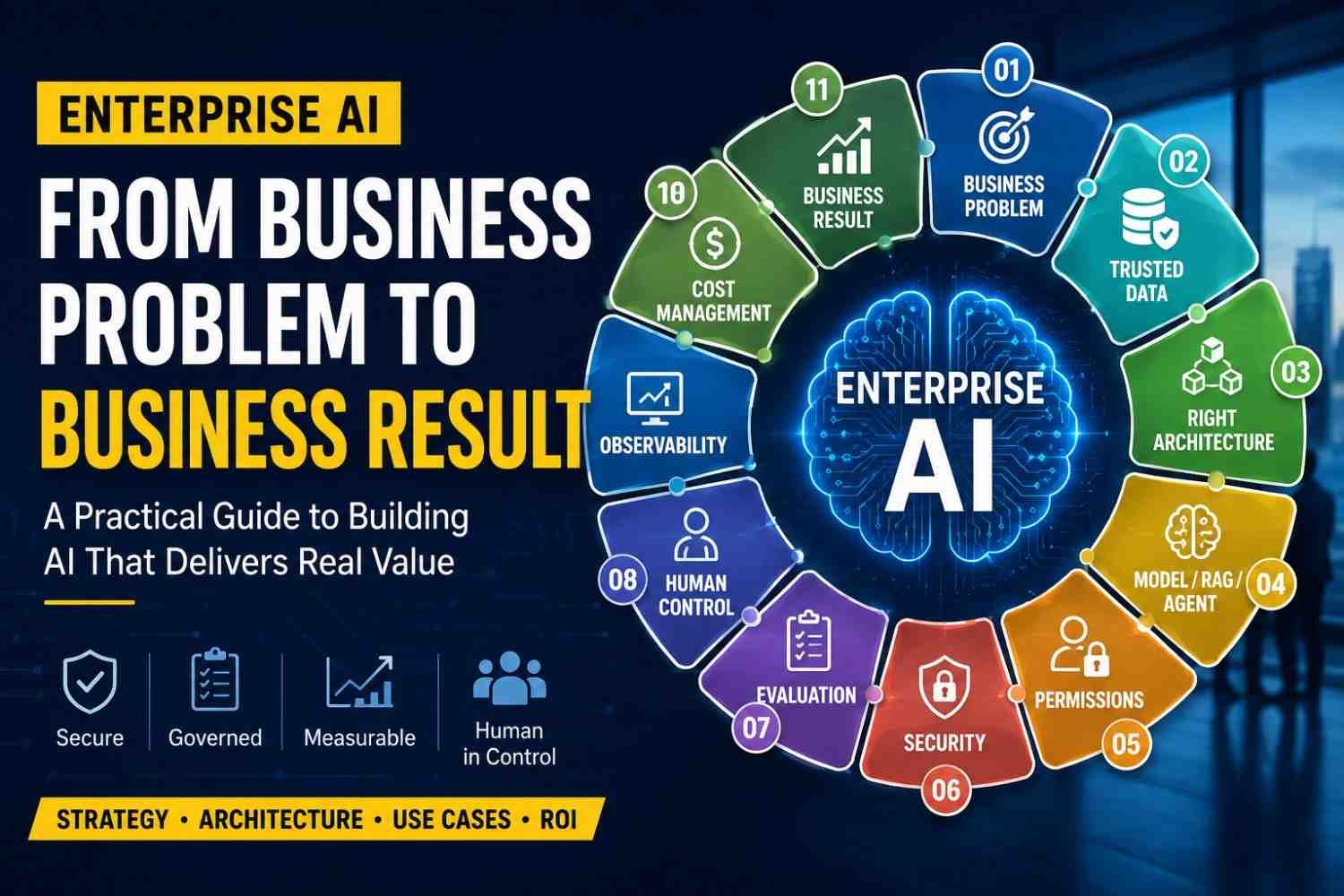
You have a business problem. Then find trusted data. Build the right architecture around it. After that choose model, RAG, or agent. Give only needed permissions. Put security around the workflow. Test the answers. Keep human control where mistake can hurt. Watch logs, quality, failures, and cost.
This part often gets ignored.
A powerful LLM may change next month. Maybe you even replace it. Your business process still stays.
So Enterprise AI is not really about owning the smartest model. It is about making AI work safely inside real company work.
When workflow, data, permissions, evaluation, governance, observability, cost, and result all connect properly, then you have useful Enterprise AI.
