
You want Instagram gone. Maybe you are tired of it, worried about privacy, or simply done scrolling. Fine. But don’t hit Delete account too fast.
Deleting an Instagram account takes only few minutes. What comes after is more serious. Your photos, videos, comments, likes and followers can be permanently removed. Meta says an account is normally permanently deleted after 30 days, though the time allowed to cancel deletion can differ by region. The full deletion process may take up to 90 days.
And finding the delete button itself can feel confusing now. Instagram puts account deletion inside Meta Accounts Center, so many old guides show menus you may not see anymore.
Before we delete anything, we will check delete vs deactivate, backup your Instagram data, exact deletion steps, 30-day and 90-day confusion, messages, linked accounts, recovery, and common deletion problems.
Last verified: August 2026.
Before You Delete Instagram: Choose the Right Exit
Deleting Instagram looks simple. Tap some settings, confirm, done. But this is where people make a bad choice.
Sometimes you are angry. Tired of reels. Privacy worry. Too much scrolling. I also feel, when we decide in that mood, permanent delete can feel right for five minutes. Later maybe not.
So first decide what you actually want.
Permanently Delete Instagram
Permanent delete means you are asking Instagram to remove the account, not just hide it.
Your profile goes away. Photos, videos, followers, comments and likes connected with your account are removed. Instagram says after the deletion period ends, your account information cannot be recovered. Instagram normally says deletion happens after 30 days, though cancellation time can differ by region.
This choice fits when you really finished with Instagram.
Temporarily Deactivate Instagram
Deactivation is softer.
Your profile becomes hidden. People cannot normally see your profile while it is deactivated, but you are not throwing the account away. You can come back later by reactivating it. Meta still provides this option through Accounts Center.
Think of it like closing the door, not breaking the house.
Delete vs Deactivate Instagram: Which One?
| Your situation | Better choice |
|---|---|
| Need social media break | Deactivate |
| Temporary privacy worry | Deactivate |
| Leaving Instagram forever | Delete |
| Not sure about coming back | Deactivate |
| Want account removed permanently | Delete |
If you are even little unsure, deactivate first.
A week later, you may think different. Permanent deletion gives much less room for that regret.
The 60-Second Pre-Deletion Safety Check
Before you press Delete account, stop for one minute.
Really. One minute can save a lot of trouble later.
I have seen people think only about one thing: I want Instagram gone. Then later they remember old family photos, saved videos, business posts, or another Instagram profile sitting in the same Accounts Center. That regret comes little late.
So I use a simple check. S.A.F.E.
S — Save Your Information
First, save what matters to you.
Instagram lets you export your information through Accounts Center → Your information and permissions → Export your information. You can choose the profile and information you want to export.
Maybe you think, “I don’t need those old photos.”
Still check once.
Some photo from five years back may mean nothing today, but next year it can.
A — Account Check
This one looks silly until somebody deletes wrong profile.
If you have personal, business, creator, or old Instagram accounts connected, look at the username carefully before continuing. Meta’s Accounts Center can manage several connected accounts in one place.
Don’t trust only profile picture.
Read the name.
F — Find Linked Services
Look around before leaving.
Is your Instagram connected with Facebook, Threads, or Edits?
This matters more now because Meta services can share account connections. For example, Meta says deleting the Instagram account associated with Edits also deletes Edits-related information.
Know what is connected first. Then decide.
E — Exit Choice
Now ask yourself one small question:
Do I want Instagram gone forever, or I just need peace for some time?
Instagram offers both deactivation and permanent deletion.
If you are not fully sure, deactivation is the safer door.
Delete only when your answer is clear.
How to Download Your Instagram Data Before Deleting
Before you delete Instagram account, save your stuff first. Really, do this before anything.
I have seen people thinking, “Photos are already in my phone, so no problem.” Then later they remember an old Reel, archived Story, chat, or post which was not saved anywhere. By that time, getting it back may become a headache.
Instagram itself gives an option to export your information through Meta Accounts Center.
What should you save?
Don’t only think about photos.
You may want to keep:
- Photos and videos
- Reels
- Stories and archived content
- Profile and account information
- Comments or activity details
- Messages or other data important for you
Maybe most of it looks useless today. But one old photo, business chat, or memory can matter after one year.
Download your Instagram information
Go to:
Instagram → Settings → Accounts Center → Your information and permissions → Export your information → Create export.
Then select your Instagram profile and choose what information you want. Meta also lets you choose things such as date range, format and media quality for an export to your device.
Don’t expect a big Instagram data download to always come instantly. When an export is ready, Meta says it stays available in Available downloads for four days.
One small thing I would never skip: open the downloaded file before deleting Instagram.
Check some photos. Look for important videos and needed data.
A backup is useful only when the things you wanted are really inside it.
How to Delete Instagram Account Permanently in 2026
If you just want the short path, here it is.
Instagram → Profile/Menu → Accounts Center → Personal details → Account ownership and control → Deactivation or deletion → choose your Instagram account → Delete account → Continue.
This is the current way Instagram gives for permanent account deletion through Meta Accounts Center. It works from phone or computer, though button place can look little different after app updates.
Do not hurry here.
I say this because deleting Instagram is one of those things which looks small on screen. Just few taps. But once you confirm wrong account, especially when you have personal, business, old account all connected, then stress starts.
Step 1 — Open Instagram and Accounts Center
Open Instagram and go to your profile.
Tap the menu icon. From settings area, enter Accounts Center.
Many people get stuck here because they search for a big “Delete Instagram” button inside normal profile settings. It may not be sitting there. Meta moved these account controls inside Accounts Center.
So if old YouTube video or old blog showing another path, leave that. Use current Accounts Center route.
Step 2 — Open Personal Details
Inside Accounts Center, find Personal details.
Tap it.
This page handles some important things tied to your Meta account setup. You are getting closer now, so just read each option once. No need to tap fast.
Step 3 — Choose Account Ownership and Control
Next, open Account ownership and control.
The name sounds little serious because it is serious. This is where Meta keeps controls related to deactivation and permanent deletion.
You may also see other account-related choices around there. Ignore them for now.
Step 4 — Tap Deactivation or Deletion
Choose Deactivation or deletion.
Now this is the point where two very different roads come.
One road hides account for some time.
Other road removes it permanently.
People mix these two very often.
Step 5 — Select the Instagram Account You Want to Delete
Instagram will ask which account you want to manage.
Stop here for few seconds.
If you have more than one Instagram account, check the username and profile picture properly.
I would even open the profile in another tab before this step if the accounts look similar.
Deleting your old test account is one thing.
Deleting your main five-year account by mistake is completely another pain.
Step 6 — Choose Delete Account
Select Delete account, not Deactivate account.
Deactivation is for people who may come back.
Deletion is for people who really want the account gone.
Meta itself separates these two choices inside the same control area, so read the screen before tapping Continue.
Step 7 — Confirm the Request
Tap Continue.
Instagram may ask you to confirm your choice, give a reason, or enter your password again.
That password check is normal. It helps stop another person from deleting an account just because they got temporary access to your phone.
If password is not working, don’t keep guessing again and again. Reset it through official Instagram recovery first.
And please don’t use random “account deletion service” websites.
Step 8 — Note Your Deletion Date
This part people forget.
After sending the deletion request, note the date Instagram shows you.
Take a screenshot.
Write it somewhere.
Meta says accounts are generally permanently deleted after 30 days, but it also says the number of days available to cancel deletion can vary by region. The full deletion process can take up to 90 days in Meta’s systems. That 90-day period does not mean you automatically get 90 days to bring the account back.
So after you press Delete, don’t just think, “I will remember.”
We normally don’t.
Keep the date.
If you change your mind before Instagram’s shown deadline, that date can become very important.
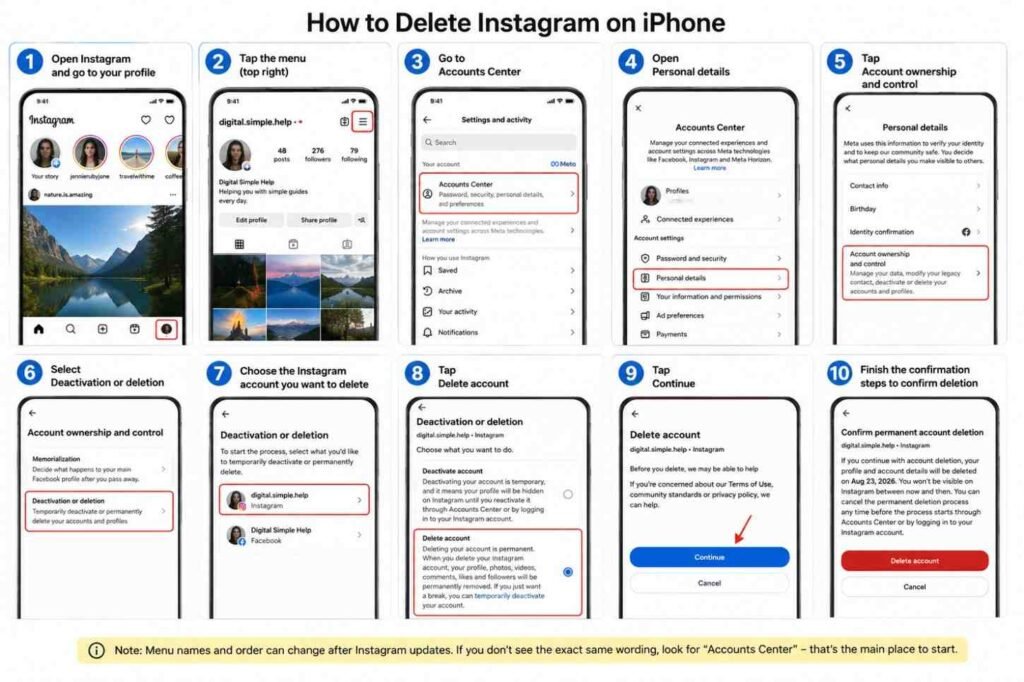
How to Delete Instagram on iPhone
Deleting Instagram on iPhone is not hard, but finding the delete place can annoy you. I also feel Instagram put this option little deep inside settings. You open one menu, then another menu, and may think, “Where is delete account?”
Here is the current path:
Instagram app → Profile → Menu → Accounts Center → Personal details → Account ownership and control → Deactivation or deletion → Choose account → Delete account → Continue.
First open Instagram on your iPhone. Tap your profile picture at bottom right. Now tap the menu on top right. Go into Accounts Center.
Then open Personal details. Tap Account ownership and control, then Deactivation or deletion. Instagram will show the profiles connected there. Choose carefully. I would stop here for few seconds, especially if you have personal and business accounts together. Wrong tap can become a big headache.
Select Delete account, not deactivate, and tap Continue. Instagram may ask you to finish some confirmation before accepting it.
One small problem: menu wording can move or look little different after Instagram app updates. So don’t panic if one screen not exactly match an old YouTube video. Look for Accounts Center first. That is the important door now.
How to Delete Instagram on Android
Deleting Instagram on Android is not hard, but finding the delete button can feel little confusing now. I checked this because old guides still show menu paths that no longer match well.
Open Instagram on your Android phone. Go to your profile, tap the menu, then open Accounts Center. From there, go into Personal details → Account ownership and control → Deactivation or deletion. Pick the Instagram account you really want gone, choose Delete account, then continue with the screen instructions.
One thing I would check twice: the username. If you have two or three Instagram accounts on same phone, wrong selection can happen very easy.
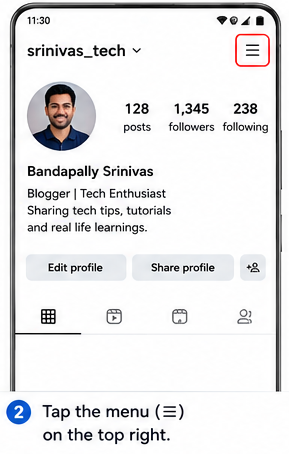
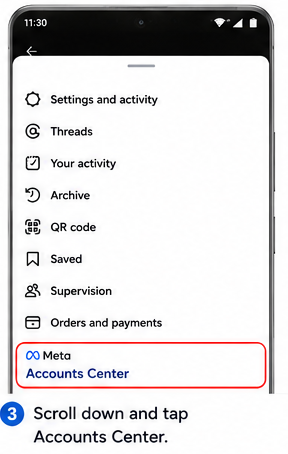
Step by Step process to delete your Instagram Account with screenshots on Android Phone:
1. Open the Instagram app on your Android phone.

2. Tap the three horizontal lines (menu) on the top right.
3. Scroll down and directly select Accounts Center.
4. Go to Personal details
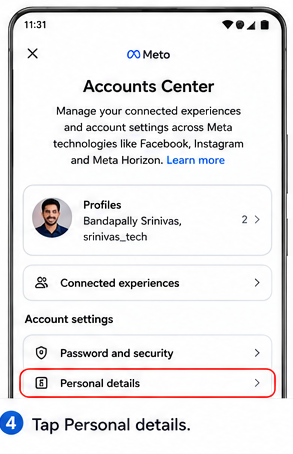
5. Then select account ownership and control.
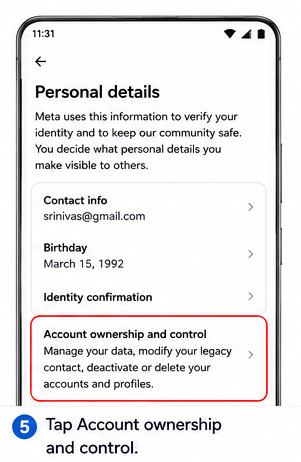
6. Now, select Deactivation or deletion.
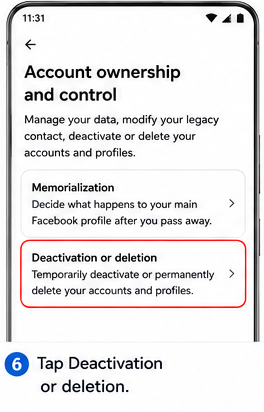
7. Select your Instagram account whether its Instagram, or Facebook.
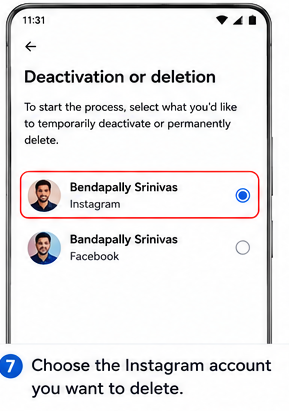
8. Next, select temporary, or permanent which option you want. Here I selected permanent.
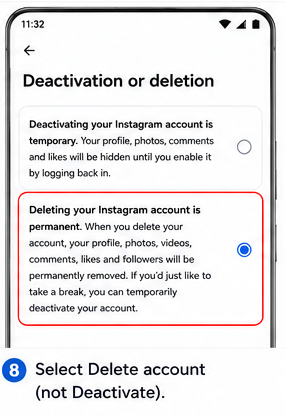
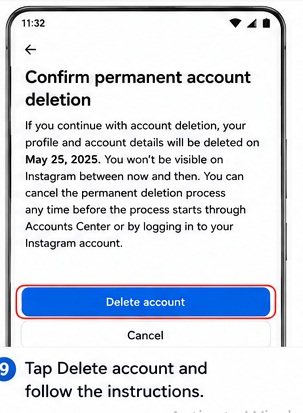
9. Tap delete Account and follow the further instructions.
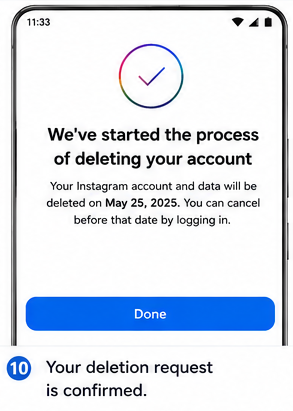
10. Finally, tap on Done.
Android and iPhone now mostly follow same Accounts Center system for Instagram account deletion.
Also, removing Instagram app from Android is not deleting your account. That mistake happens more than we think.
How to Delete Instagram From a Computer
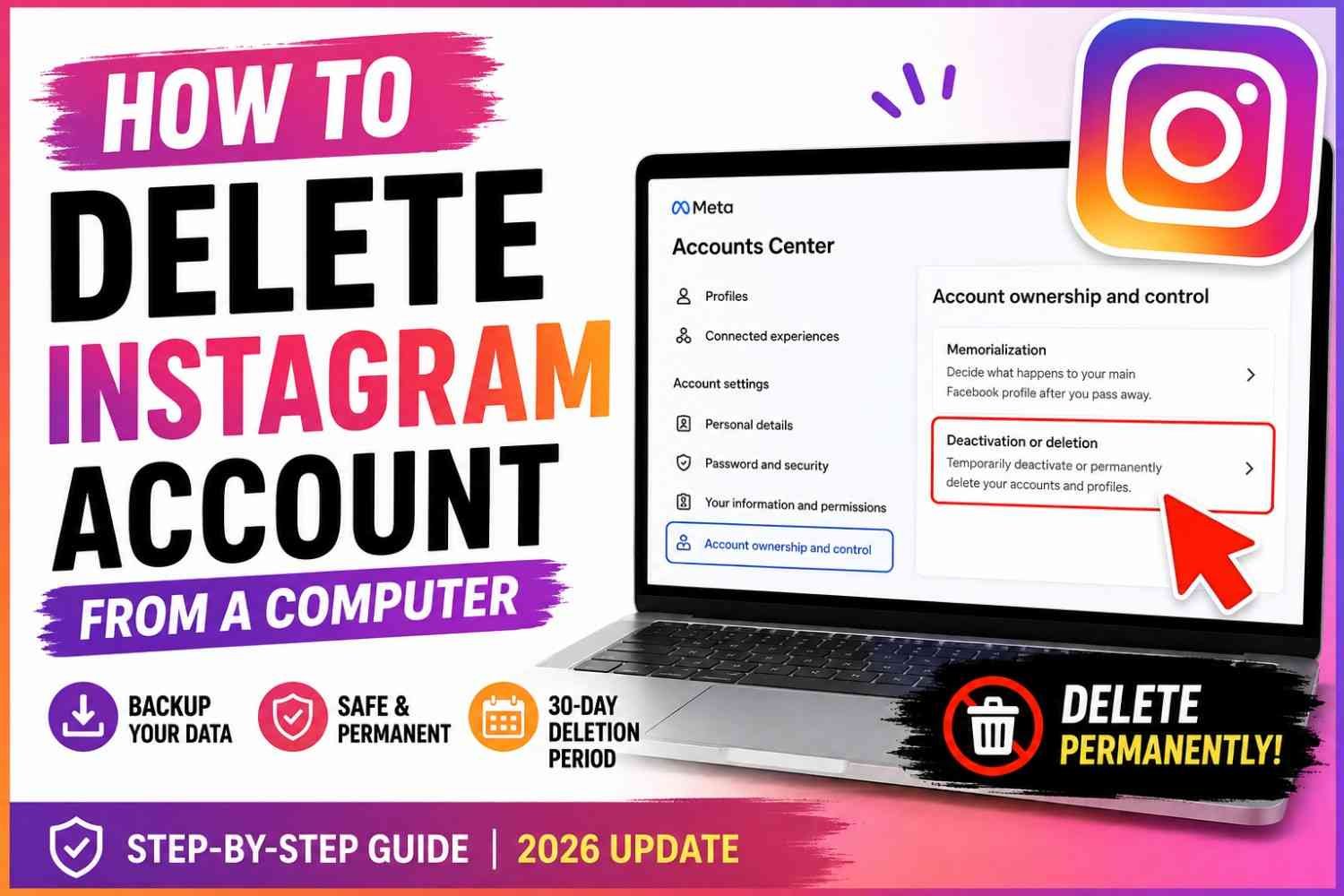
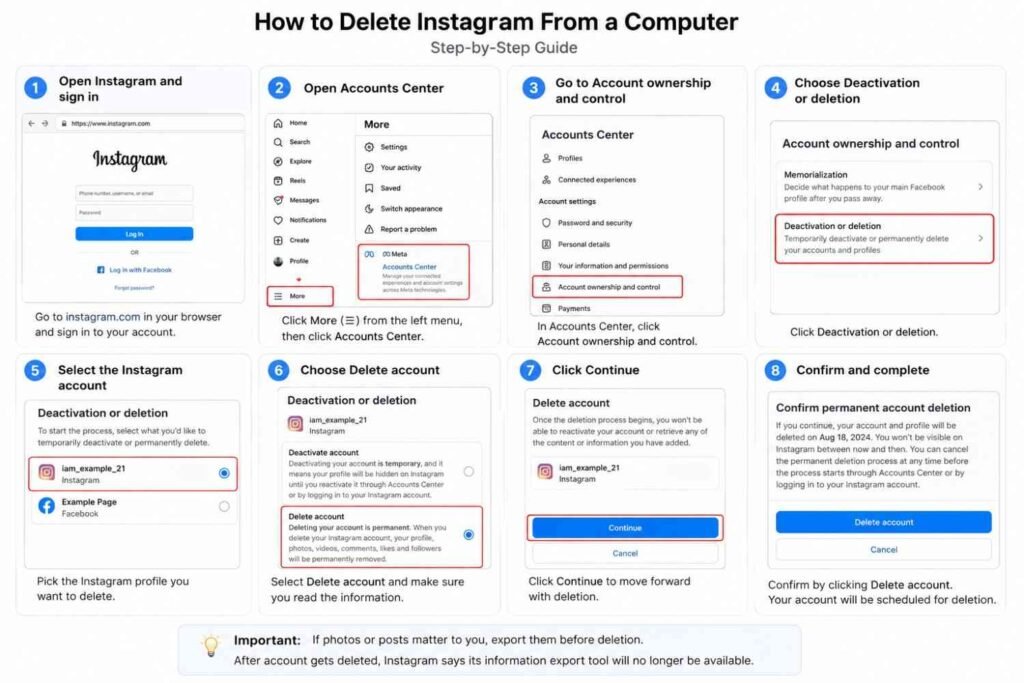
Deleting Instagram from computer can feel little confusing. I also noticed desktop menus sometimes make you look around more than phone app. But you can still delete Instagram account from a computer. Meta officially says permanent deletion can be done from phone or computer.
First, open Instagram in your browser and sign in. Check username once. Really check it, especially if you have two or three Instagram profiles.
Then open Accounts Center. Go toward Account ownership and control, then choose Deactivation or deletion. Pick the Instagram profile you really want gone. After that, choose Delete account and click Continue.
That is the part many people miss. They keep searching normal Instagram settings and think, “Where is delete account option?”
One more thing. If photos or posts matter to you, export them before deletion. After account gets deleted, Instagram says its information export tool will no longer be available.
What Happens After You Delete Your Instagram Account?
You clicked Delete account. Now mind may start asking many things.
Is my Instagram gone already? Can friends see me? What about my old photos? Can I get it back?
These doubts are normal because Instagram account deletion does not work like deleting one photo.
Your profile becomes unavailable
After you request to delete Instagram account permanently, your profile and content are not accessible to other Instagram users during the deletion period. Meta says this clearly in its Instagram Help Center.
So, your friend searching your profile may not see your normal account like before.
This is where some people get scared. They think account already permanently gone. Not exactly.
Instagram normally gives a deletion period first.
What happens to photos, followers, likes and comments?
Your Instagram life is connected to many small things.
Photos. Videos. Followers. Comments. Likes.
After permanent deletion happens, Meta says your account and information gets permanently deleted and you cannot retrieve that information again.
That is why I would never click Delete just because I am angry with Instagram today.
Save important things first.
Can you log back in?
Here comes one important part.
Meta currently says an Instagram account is permanently deleted after 30 days from the deletion request, but it also says the number of days allowed to cancel deletion can vary by region.
So don’t blindly depend on “I have 30 days.”
Look at the actual deletion date Instagram shows for your account.
If you change your mind, try logging in before that deadline and follow the cancellation option Instagram gives you.
Can people still search for you?
Inside Instagram, your account content becomes unavailable during the deletion period.
Google is another story.
Sometimes an old Instagram result may still appear in Google Search even after the original page changed or disappeared. Google itself says old descriptions or cached results can remain outdated, and its Refresh Outdated Content tool can request an update.
So seeing your old Instagram name on Google does not always mean your Instagram account is still active.
The Instagram 30-Day vs 90-Day Rule Explained
This part confused me first time too. You press delete Instagram account, then Instagram talks about 30 days. Somewhere again you see 90 days. So mind says, “Okay, maybe I still have 90 days to get account back.” No. That thinking can create big problem.
Keep this simple in your head:
30 days ≈ time where account deletion may still be cancelled.
Up to 90 days ≈ time Meta may need for its systems to finish deleting stored copies.
Meta says that after an Instagram account deletion request, your account and information are permanently deleted after the applicable deletion period. Meta also notes that the number of days available to cancel can differ by region, so the deletion date shown inside your own account is the one you should watch carefully.
The important thing is this: 90 days does not mean you get another 60 days to recover Instagram account.
I would never depend on that 90-day number for account recovery.
Why Instagram Doesn’t Erase Everything Instantly
Think about deleting one photo from your phone versus removing information from many connected computer systems. Not same thing.
Meta says its deletion process may take up to 90 days after it begins. Copies can also stay longer inside backup storage used for things such as disaster recovery, software errors, or other data-loss problems. Some information may also be kept for legal matters, Terms violations, or harm-prevention work.
So your account disappearing and every backup copy being erased are two different jobs.
That is where people get trapped.
Can You Recover Your Account During Those 90 Days?
Don’t see Meta backup like your Google Drive backup. You cannot simply say, “My data is somewhere in backup, restore it please.”
That backup is mainly for Meta’s systems, not a personal recovery box offered to you.
If you changed your mind, act before the deletion deadline shown by Instagram. Log in, check whether cancellation is still offered, and do it immediately.
Once permanent deletion finishes, don’t build hope around the 90-day technical process.
30 days is about your decision. 90 days is mostly about Meta finishing its cleanup.
What Happens to Instagram DMs After You Delete Your Account?
Many people think, “I delete Instagram account, so my old messages also gone.” I used to think same thing. But DMs need little more care.
Deleting your Instagram account and unsending a message are not same action.
Instagram says when you delete a conversation from your own inbox, it does not delete that conversation for other people. If you want a sent message removed from the chat, Instagram gives a separate Unsend option. Once unsent, that message will no longer be visible to people inside that chat. But they may already seen it before you unsend.
So, can another person still see old Instagram conversations after you leave? Do not assume account deletion will clean every message copy for you. This is where many users make mistake.
I would check my DMs before deleting Instagram, mainly if old chats have:
- private photos or videos
- phone numbers or addresses
- bank/payment information
- personal arguments
- work or business details
For a sensitive message, open chat → press and hold your sent message → choose Unsend. Instagram confirms unsending removes that message from visibility in the chat.
One more thing. Deleting the full conversation only clears it from your inbox, not everybody else’s.
So clean important DMs first. Then delete account.
Related: How to Delete Instagram Messages Permanently
What Happens to Threads, Facebook and Edits?
Deleting Instagram looks like one account job. But now Meta apps sit close together. Threads, Facebook, Edits, logins—all can touch your Instagram in some way. So before delete, I would check them once. It save one bad surprise later.
Instagram and Threads
Threads is the one I would check first.
Meta says deleting only your Threads profile does not delete your Instagram or Facebook account. But other direction is different. If your Threads profile was created using that Instagram account, deleting the Instagram account will also delete that Threads profile.
So, you use Threads every day? Stop here for a minute. Open Threads, see which account made that profile. Don’t think, “I can fix it after Instagram gone.” Better check now.
Instagram and Facebook
Instagram and Facebook can live inside the same Accounts Center, but being connected does not mean both are one delete button. Accounts Center lets you manage different accounts and profiles separately.
This part can confuse you. I also feel Meta’s account screen sometimes make simple thing look bigger.
Before pressing Delete account, read the profile name again. Check photo. Check username. Especially when your personal Instagram, business Instagram and Facebook all sit there together.
Instagram and Edits
Edits need more care. Meta says deleting the Instagram account also deletes Edits connected with it. Meta also says some information about your use of Edits is tied with Instagram.
Maybe you made videos there and forgot about them. Save what matters first.
Meta Ecosystem Check: Instagram ✓ Facebook ✓ Threads ✓ Edits ✓ Connected logins ✓
Five small checks. Much easier than regret after delete.
How to Delete One Instagram Account Without Deleting Another
Having many Instagram accounts can make this part little scary. Maybe you have one personal account, one business page, an old account you never use, and another creator profile. All sitting in same phone.
You only want one gone. Not all.
Good thing is, Instagram lets you choose the particular account you want to delete. Meta’s current process takes you through Accounts Center → Account ownership and control → Deactivation or deletion, then asks you to select the account.
This account selection screen is where I would slow down.
Don’t tap fast.
Look at the username.
Suppose your accounts are:
@ravi_personal@ravi_store@ravi_oldpage@ravi_creator
You wanted to delete @ravi_oldpage. But profile photos may look almost same. Small screen, quick tapping, we easily choose wrong one.
Warning: Before tapping Continue, verify the username—not just the profile photo.
After choosing the right profile, select Delete account, then Continue. Meta separately gives an option called Deactivate account, so read that screen properly too.
One more confusion happens here. Removing an account from Accounts Center is not the same action as permanently deleting that Instagram account. Meta gives a separate “Remove account” option for disconnecting accounts from Accounts Center.
My simple rule here: read the username twice before pressing anything permanent. Ten extra seconds can save your business page, followers, posts, and a lot headache.
Forgot Your Instagram Password but Want to Delete the Account?
You want delete Instagram account, but password gone from mind. This small thing can become big headache. I seen this happen more when two or three Instagram accounts living inside same phone.
Instagram generally need you to get account access before you can control or delete it. Meta’s own help page tells users who cannot log in to recover password, fix email problems, or confirm identity first.
Reset Your Password First
Open Instagram login screen and tap Forgot password? Enter your username, not some guessed email first. Instagram’s official recovery steps allow username-based recovery and then give on-screen instructions.
My simple rule here: don’t hurry.
Check these three things:
- Exact
@username - Email connected with that account
- Phone number/account identity
Then reset password, login, and start Instagram account deletion.
Password Reset Opens the Wrong Instagram Account
This one feels confusing. You tap recovery link, suddenly old account opens. Why this guy came here?
Multiple saved logins and connected accounts can appear on the same device, and Meta lets several accounts live inside Accounts Center.
So look at username carefully before doing anything.
Don’t pay random “Instagram deletion service” people. First recover your real account through Instagram itself. Then delete the right one.
How to Delete a Hacked Instagram Account
If your Instagram got hacked, deleting it fast may feel like first thing to do. I understand that feeling. You open Instagram, your name changed, strange post there, maybe email also changed. Mind says, “just delete this account now.”
But no. First get it back.
Recover → Secure → Review → Delete
Recover control of the account
If you cannot login, use Instagram’s hacked account recovery page. Instagram itself tells hacked users to go through its account recovery process.
If hacker changed your email, check old inbox too. Instagram says an email from security@mail.instagram.com may contain a link to reverse that email change.
Do this quickly. Waiting only gives other person more time.
Change password and secure access
Once you are back inside, change Instagram password. Not your old password with one extra number. Make a new one.
Also secure your email account. This part people forget. If hacker still controls your email, they may enter Instagram again.
Turn on two-factor authentication too. Instagram calls 2FA one of the strongest ways to stop unknown login attempts.
Remove unknown sessions and connections
Now look around slowly.
Check logged-in devices. Check Accounts Center. Remove accounts or connections you don’t know. Instagram also advises removing linked accounts you do not recognize.
I would also check bio, phone number, email, posts and messages before leaving.
Delete only after account ownership is restored
Only when the account is truly yours again, move to deletion.
Why?
Because deleting while hacker still controls access can leave you confused, locked out, or unable to confirm what happened.
First take the house key back.
Then lock the doors.
Then, if you still want, leave the house for good.
Accidentally Requested Instagram Deletion? Do This Now
That moment can feel bad. You open Instagram, try to take some break, press few settings, and later realize — wait, I requested permanent deletion.
Do not keep checking random YouTube videos first. Time matters here.
Instagram says your account and information are permanently deleted 30 days after the deletion request, though Meta also notes the cancellation period can differ in some regions.
You Still Have Access
If you can still login, try it now.
Instagram may show a message about your account being scheduled for deletion. Follow the screen option to keep the account, cancel deletion, or reactivate it, whichever Instagram shows for your account.
I would also note the deletion date somewhere. Screenshot it. Small thing, but when you are worried you forget dates very easily.
And please check the username before doing anything. If you use two or three Instagram accounts, wrong-account confusion happens more than we think.
You Forgot Your Password
Now it becomes little harder, but don’t give up while your cancellation time is still open.
Use Instagram’s official password recovery and try getting back into the same account scheduled for deletion.
Check carefully:
- Username spelling
- Email connected with that account
- Phone number
- Which Instagram profile the reset link actually opens
Do not pay some stranger who says, “I can recover deleted Instagram account.” Your password, OTP, recovery code — don’t give these things away.
Your Deletion Deadline Already Passed
This is where I would not give you fake hope.
Instagram says after the applicable deletion period, your account and information are permanently deleted and cannot be retrieved.
You may also see Meta saying deletion can take up to 90 days. That sounds confusing. But those 90 days are about completing deletion from systems and backups. It is not another 90-day recovery chance for you.
So, if you accidentally requested Instagram deletion and still can login, act now. Tomorrow may still work. Or maybe your deadline is closer than you thought.
Instagram Won’t Let Me Delete My Account — Troubleshooting
Sometimes deleting Instagram looks very easy in guides. Then you open your phone and nothing matches. I have seen this kind of problem many times with apps. Menu moved, old video still ranks in Google, one account opens instead of another. You start thinking, “Why Instagram won’t let me delete my account?”
Most times, account is not stuck forever. The issue is usually login, wrong profile, old steps, or security check.
Delete option is missing
Problem: You open Settings but cannot find “Delete account.”
Likely reason: You may be following an older tutorial. Instagram now handles account deletion mainly through Meta Accounts Center. Meta’s current path uses Personal details → Account ownership and control → Deactivation or deletion.
Fix: Open Instagram and go into Accounts Center. Do not keep searching every normal setting page. Once there, look for the profile you actually want removed.
Wrong Instagram account appears
This one can scare you, mainly when you have personal, business, or old Instagram profiles connected together.
Do not continue fast.
Check the username first. Profile photo alone can confuse you.
Accounts Center can manage connected Instagram, Facebook and other Meta accounts, so selecting the correct profile matters.
Fix: Switch to the right Meta/Instagram profile, then open Deactivation or deletion again.
Instagram rejects your password
Maybe you know the password. At least you think so. Still Instagram says no.
Do not keep guessing many passwords.
Instagram’s official recovery method lets you use your username, email address, or phone number from the login screen and request a login link or reset instructions.
Fix: Reset the password first, log into the correct account, then return to deletion.
Deletion page keeps loading
I would try simple things before worrying.
- Update Instagram.
- Close and reopen the app.
- Restart your phone.
- Try Instagram from a web browser.
- Sign out and back in if safe to do so.
- Clear browser cache/session when the page itself looks broken.
- Open Accounts Center again.
Sometimes app screen is the problem, not your account.
Instagram asks for identity verification
This can feel annoying when you already decided to leave.
But Instagram may need to confirm account ownership before sensitive account actions. If you cannot log in, Meta’s recovery help also covers password problems, email issues and identity confirmation.
Finish the genuine verification request instead of trying random “Instagram deletion services.”
You cannot access your email or phone
Now deletion becomes an account-recovery problem first.
If the account was hacked or another person changed access details, Instagram directs users to its hacked-account recovery process.
Recover the account. Secure it. Then delete it.
That order may feel slower, but it protects you from deleting the wrong profile—or giving account details to somebody who cannot really help.
Can You Recover a Permanently Deleted Instagram Account?
Once Instagram has permanently deleted your account after the allowed deletion period, you should not expect to get it back. Instagram itself says a deleted account cannot be restored.
But one thing confuse many people here.
If your account is only pending deletion, there may still be time. Instagram normally says the account and information become permanently deleted after 30 days, although Meta also says the number of days you can cancel may vary by region. So, if you changed your mind, check it quickly. Don’t leave it for last day.
I see another confusion often. People read that Instagram deletion can take up to 90 days and think, “My data is there, maybe support can bring account back.”
Not really.
Those backup copies are for things like disaster recovery, software errors, legal matters, or safety needs. They are not your personal recovery copy sitting there waiting for you.
And please be careful when panic starts.
Someone may say, “I can recover permanently deleted Instagram account, pay me first.” Another may ask your password or login code. Don’t give it. The FTC says anyone asking for your verification code is a scammer.
If deletion is still pending, use Instagram’s official recovery path. If permanent deletion finished, paying a stranger usually gives you another problem, not your account.
Instagram Account Deletion FAQ
How long does Instagram take to delete an account?
Instagram normally gives around 30 days after you request account deletion. After that, your profile and information gets permanently deleted and you cannot get it back. Meta also says full deletion from its systems may take up to 90 days. The cancellation time can be different in some regions.
Does deleting Instagram delete everything immediately?
No. This part confuse many people. Your account may look gone to other Instagram users during the deletion period, but Meta is still doing deletion in background. Some backup copies also may stay after 90 days for disaster recovery, legal issues, rule violations or harm prevention.
Can I recover Instagram after 30 days?
Usually, no. This is where I would be very careful. Many people see “90 days” and think, maybe I still got another 60 days. It don’t work like this. Meta says after permanent deletion you cannot retrieve your information. The 90 days is about its deletion systems, not your personal recovery window.
Does deleting Instagram delete my messages?
Don’t delete account thinking every old chat will magically vanish everywhere. Account deletion and removing a message are different things. If some message is important, private, or you regret sending it, handle that before deleting account. I always say, check your DMs first. Small work now can save headache later.
Can I use the same Instagram username again?
Maybe, but never depend on it. Once your account is gone, username availability can change. Somebody else may take that name. If your Instagram username is tied with your business, blog, or personal brand, think two times before permanent deletion.
Does deleting Instagram also delete Facebook?
Deleting your Instagram profile is not same thing as deleting Facebook. Still, Meta Accounts Center can hold several profiles together. So look at the profile name carefully before touching Delete account. One wrong tap with multiple accounts can make a simple job feel very scary.
What happens to Threads if I delete Instagram?
This needs attention. Meta says a Threads profile may be deleted when you delete the account that was used to sign up for Threads. Threads can also be deleted separately. So if you use Threads, check that profile before deleting Instagram blindly.
Can I delete Instagram without my password?
Normally you need access to the account. Instagram can ask you to re-enter your password during deletion or deactivation steps. If password is lost, first recover account access. Don’t pay random “Instagram recovery expert” just because you are in hurry.
Does uninstalling Instagram delete my account?
No. Removing Instagram app from your phone only remove the app. Your profile is still there. Photos, followers, comments, messages, everything connected with account can remain. To permanently delete Instagram account, you need use the actual Deactivation or deletion setting.
Can someone find my deleted Instagram on Google?
Sometimes an old result can still appear in Google for some time. Search engines and Instagram are two different systems. Even when Instagram profile becomes unavailable, an older search result or cached title may not disappear at exactly same moment.
Should I deactivate Instagram instead?
If you are not fully sure, I would choose deactivation first. Maybe you are angry today. Maybe social media feels heavy. Two weeks later, you may want your photos or contacts back. Deactivation hides your profile without making that final permanent choice. Instagram provides both options inside its account controls.
Final Instagram Exit Checklist
Before you hit Delete account, stop for one minute. Really check things.
- Download photos, videos, messages, or anything you may want later.
- Look at the Instagram username again. Wrong account deletion can become a big problem.
- Check Facebook, Threads, Edits, and other Meta accounts connected with it.
- If your mind still saying, “Maybe I come back,” choose deactivate, not permanent delete.
- Read the deletion date shown by Instagram. Take screenshot also. I would do that.
- Do not think the 90-day backend deletion means you have 90 days to recover. It does not work like that.
- Make sure your email and password still working. You may need them if you change your mind.
- Save the final deletion date somewhere.
Many people worry only after pressing the button. Better worry a little before.
Deleting Instagram takes minutes. Making sure you won’t regret it takes a little longer—and that’s the part worth doing carefully.
Read Next: 80th India Independence Day 2026.
